App Store

Icon of Yoink for iPad and iPhone

Yoink v2.0.1 for iPad and iPhone brings many bug fixes and improvements, increasing the overall stability and performance of the app. It is a free update for existing customers.

Yoink Overview

What’s Yoink?

Yoink is your storage space (or “shelf”, as some would call it) for everything you’d like to keep around for a little while – text snippets, images, files – just about anything you wish.
Use drag and drop with Yoink as a Slide-Over or Side-by-Side app to store files, or use the Action/Share extension, the Today Widget or the File Provider to get files into Yoink.
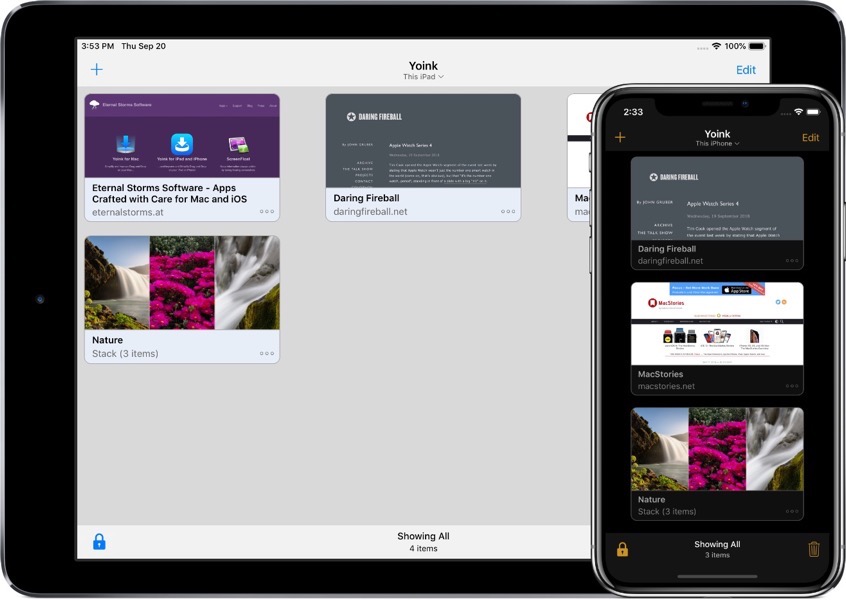
Screenshot of Yoink running on iPad and iPhone

How does Yoink work?

The most obvious use case is to drag and drop files to it from other apps, like selected text, or images from websites, or emails, or map locations, just to name a few.
However, there are a number of ways to save files in Yoink:
– Yoink’s Share/Action extension shows up in almost any share sheet
– The Today widget lets you quickly store your clipboard’s contents
– In the Files app, you can drag and drop files to Yoink’s file provider (and actually do that from any app that supports iOS 11’s files browser)
– Siri Shortcuts help you save your clipboard’s contents or start downloads with a simple voice command, and without having to activate Yoink 

So, now that you’ve got all your files in Yoink, how can you get them out again?

– You can drag and drop anything from Yoink to any other app that supports drag and drop (and the dragged file types).
– Anything in Yoink can be copied to your clipboard.
– Yoink’s keyboard: Wherever you’re editing text, Yoink is right there with you – in the form of a keyboard.
On iPad, drag and drop items out to where you’d like them in your text; on iPhone tap to copy items.
– Yoink’s Today widget: Tap any item in the widget and it’s copied to your clipboard
– The file provider: Any app that support’s iOS 11’s Files browser can access items stored in Yoink
– Spotlight search: The system-wide search can find any item stored in Yoink and take you right to it in the app

What’s New in Yoink v2.0.1?

Being a maintenance update, there are no flashy new features. Instead, the update focuses on stability, reliability and performance.
Apart from fixing a couple of crashes, improving the reliability of iCloud sync and saving items in Yoink in general and many minor improvements and bug fixes, the update now (finally! – I know) fully supports the new iPads’ screen sizes, makes it easier to access Yoink’s settings and switch to Dark/Light mode, and, when sharing a URL to Yoink, it tries to figure out for you if you’d like to download a file, or just save the link in Yoink.
You can find the full list of changes on Yoink’s App Store page.

Pricing and Availability

Yoink for iPad and iPhone is available on the App Store for the price of $5.99 / £5.99 / €6,99, with all features unlocked – there’s no subscription or in-app purchase. 

Yoink requires an iPad or iPhone that runs iOS 11 or newer. It’s available in English, German, Japanese, Simplified Chinese and Korean. More languages will follow.

Yoink is also available for (and originated on) Mac, exclusively available on the Mac App Store for the price of $6.99 / £6.99 / €7,99, with a free, 15-day trial available on its website.

Links

Yoink for iPad and iPhone – Website
Yoink for iPad and iPhone – App Store
App Preview Video – “Add”
App Preview Video – “Drag out”
Yoink for iPad and iPhone – Usage Tips
Yoink for iPad and iPhone – Press Kit

Yoink for Mac – Website
Yoink for Mac – Mac App Store
Eternal Storms Software – Website
Eternal Storms Software – Blog
Eternal Storms Software – Twitter
Eternal Storms Software – YouTube
Eternal Storms Software – Facebook
Eternal Storms Software – Instagram

I’m looking forward to seeing and hearing what you think about this update. I hope you’ll enjoy it 🙂

If you have any feedback or questions, please don’t hesitate to write me!

With warm regards,
– Matt

Read more

It’s Black Friday (November 23rd, 2018) – here are my deals:

Yoink (Mac): $7.99 -> $5.99 (~25% off)
Website / Demo
Mac App Store

Yoink (iOS): $5.99 -> $4.99 (~16% off)
Website
iOS App Store

ScreenFloat (Mac): $8.99 -> $5.99 (~33% off)
Website / Demo
Mac App Store

Transloader (Mac): $5.99 -> $4.99 (~28% off)
Website
Mac App Store

Mac App Store Bundle

For users of macOS Mojave, I also offer an app bundle (the Eternal Storms Software Productivity Bundle), which includes Yoink for Mac, ScreenFloat for Mac and Transloader for Mac, which offers an additional ~11% off on the apps:
Eternal Storms Software Productivity Bundle (macOS Mojave): $17.99 -> $14.99 (~16% off its previous discount)
Mac App Store

Enjoy 🙂

All the best,
– Matt

Read more

What’s Yoink?

Yoink is an app for Mac, iPad and iPhone that speeds up your daily workflow by simplifying and improving drag and drop.
It accepts almost anything you can drag and stores it for you for later use, like a shelf to temporarily “hold something” for you.

Yoink for Mac Update + SALE (25% off!)

Yoink v3.4.2, available now on the Mac App Store, is a minor maintenance update recommended to everyone using the app.
The update brings improved compatibility with Firefox, Sketch and upcoming versions of Safari, as well as more reliable fetching of favicons (in, where possible, higher resolution) for URLs saved in Yoink.

As I’m sponsoring this week’s AppStories Podcast Episode, Yoink for Mac is – for the entirety of the week – on sale, about 25% off its regular price!

Links:
Yoink for Mac Website (with a free, 15-day trial)
Yoink for Mac Usage Tips
Yoink on the Mac App Store (25% off for the week)

Yoink for iPad and iPhone Update

Yoink v1.1.1, available now on the App Store, is also a maintenance update, albeit a larger one.

Among the more than 30 changes, improvements, bug fixes and new features in this update, version 1.1.1 brings:
– Live monitoring of your clipboard when used in Side-by-Side or Slide-Over mode
– Yoink’s Today Widget now offers a way to access all of Yoink’s items, instead of only the 3 most recent ones
– Improvements for item previews
– Downloads now show their progress in percent
– Improved reliability of all of Yoink’s extensions (the keyboard, Today Widget, Action/Share extension and File Provider)
– Fixed many (more or less rare) crashes in Yoink and its extensions

Links:
Yoink for iPad and iPhone Website
Yoink for iPad and iPhone Usage Tips
Yoink on the App Store

Video of Yoink’s new “live clipboard observer”

Video of Yoink’s updated Today Widget

Eternal Storms Software Logo

– – – Do you enjoy my blog and/or my software? – – –
Stay up-to-date on all things Eternal Storms Software and join my low-frequency newsletter (one mail a month at most).
Thank you 🙂

Read more

As some of you may know, getting Yoink for iOS through Apple’s App Review was, to say it lightly, a bit of a pain.
In the end, I was able to release it, but a month late. Had this been my first app as an indie developer, there’s a good chance I would have had to declare bankruptcy now.
I am fortunate enough to have a couple of apps out already that create a steady income, but still, I spent about two months exclusively on this app, so it’s still scary thinking about how I got rejected over and over.

Long story short, here’s a couple of thoughts I’ve had during all of this.

TestFlight App Review

From the very beginning, I’ve had Yoink available to a couple of (awesome) testers via TestFlight.
Now, when you add a new app or a new version of the app to TestFlight, it has to go through a review before testers can download and test it.

My question, then, is: Why not reject the app right there if it doesn’t comply with the rules in the App Reviewer’s eyes?
If this is not checked, why have a review for TestFlight apps in the first place?

Or if that’s unrealistic for some reason, perhaps TestFlight App Review could give sort of a “likelihood of getting through the ‘real’ App Review”. Maybe on the levels of “yea, good luck with that” to “possibly, tentatively not going to be rejected”.

It would have saved me (and the App Review person) a *lot* of time and nerves had, for example, the File Provider extension been rejected right then and there for not being cloud-storage based. Or the keyboard, for not having a traditional method of input. Those are all things that could have been avoided, had TestFlight App Review caught these things.

Reasons for Rejection

Yoink was rejected for different reasons and in different areas of the app.
But those reasons were given to me one by one, one submission and “Waiting for Review” -> “In Review” cycle after another.
That’s *such* a waste of time (not only for the developer, but also for the reviewer. But *especially* for the developer).
Why not keep going after finding a reason for rejection and see if there are other issues after that? If so, the reviewer could note them all down and give them to the developer all at once, not one by one.

Notice of Escalation

When an App Reviewer isn’t sure about an app, the review is “escalated”, meaning it goes up one instance in the App Reviewer hierarchy to be reviewed by a “superior”.
That would be the perfect time to let the developer know in advance that, “look, review is going to take a little longer because we’ve run into an issue with your app. Please stay tuned, we’re working on it.”.
Not only would the developer know that it’s going to take longer for the app to be reviewed, they’d also have reassurance that the App Reviewer hasn’t forgotten about the app – anybody who had an app “In Review” for more than twelve hours knows that feeling 😉

In closing, I’d like to say that I have nothing but respect for App Reviewers. Their job is difficult and, mostly, unthankful.
But I believe a lot of grievances on both sides could be avoided if some of these suggestions were put in place.

Eternal Storms Software Logo

– – – Do you enjoy my blog and/or my software? – – –
Stay up-to-date on all things Eternal Storms Software and join my low-frequency newsletter (one mail a month at most).
Thank you 🙂

Read more