macOS

(I apologize for the delay with this post, I had to work on updates for Yoink, ScreenFloat and Briefly and of course lots of work happened on flickery 😉 ).

To finally continue with my promised series of blog posts about flickery 2.0’s development, here I am back with: Uploading.
A minor disclaimer before we start: Any interface you see below isn’t anything near final, subject to change, etc etc. 

If there is one part that’s integral to any flickr client, it has to be uploading. So with 2.0, I want to make darn sure that it’s the best you can get.
Let’s dive in! 

Activity (Background Uploading)

In flickery 1.x, uploading blocked the entire app so you couldn’t do anything else but wait. Sure, you got a beautiful sheet window to look at with the currently uploading image slowly transitioning from blurry to focused representing the upload progress, but it wasn’t very user-friendly.
I wanted to change that with 2.0, so now uploads will be in the background, in the app-wide Activities panel where you can track the progress and potential errors of Up- and Downloads.
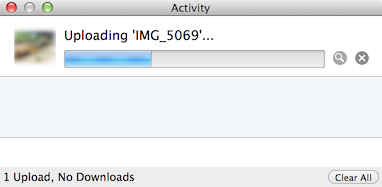
Activityview

It’s out of the way, you can close it and leave it running in the background (and of course the little image also transitions from blurry to focused 😉 ). When the activity (Up- or Download) is finished, you’ll get an OS X notification letting you know the activity is done.
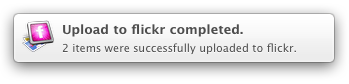
Notification

Another advantage of background uploads is that you can queue them up. You can begin one Upload and while that is running work on the next. And when you start that one, it will wait for any previous Uploads to finish and then begin uploading.

Adding to Photosets and Groups

Adding to Photosets or Groups for uploads is not very straightforward in flickery 1.x for Uploads. You can’t assign photosets right from the Upload view but have to wait until the upload finishes and the button bar at the bottom changes to “Add to Set” and “Add to Group”. By the time the upload is finished, you might not know anymore which photos you’d like to add to which photoset or you forget altogether. It’s not really a “set it, then forget it” approach.

This is going to change in flickery 2.0. Here, you’ll be able to set everything up beforehand and once the upload itself is done, photos are added to the photosets and groups you have set. So you can set everything up and leave it to flickery to do its thing.
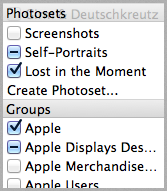
Screenshot of flickery  03 04 2014 18 02 34

Location and Maps

In flickery 2.0, it will be even easier to assign locations to selected items (both photos and videos) using Apple’s MapKit features.
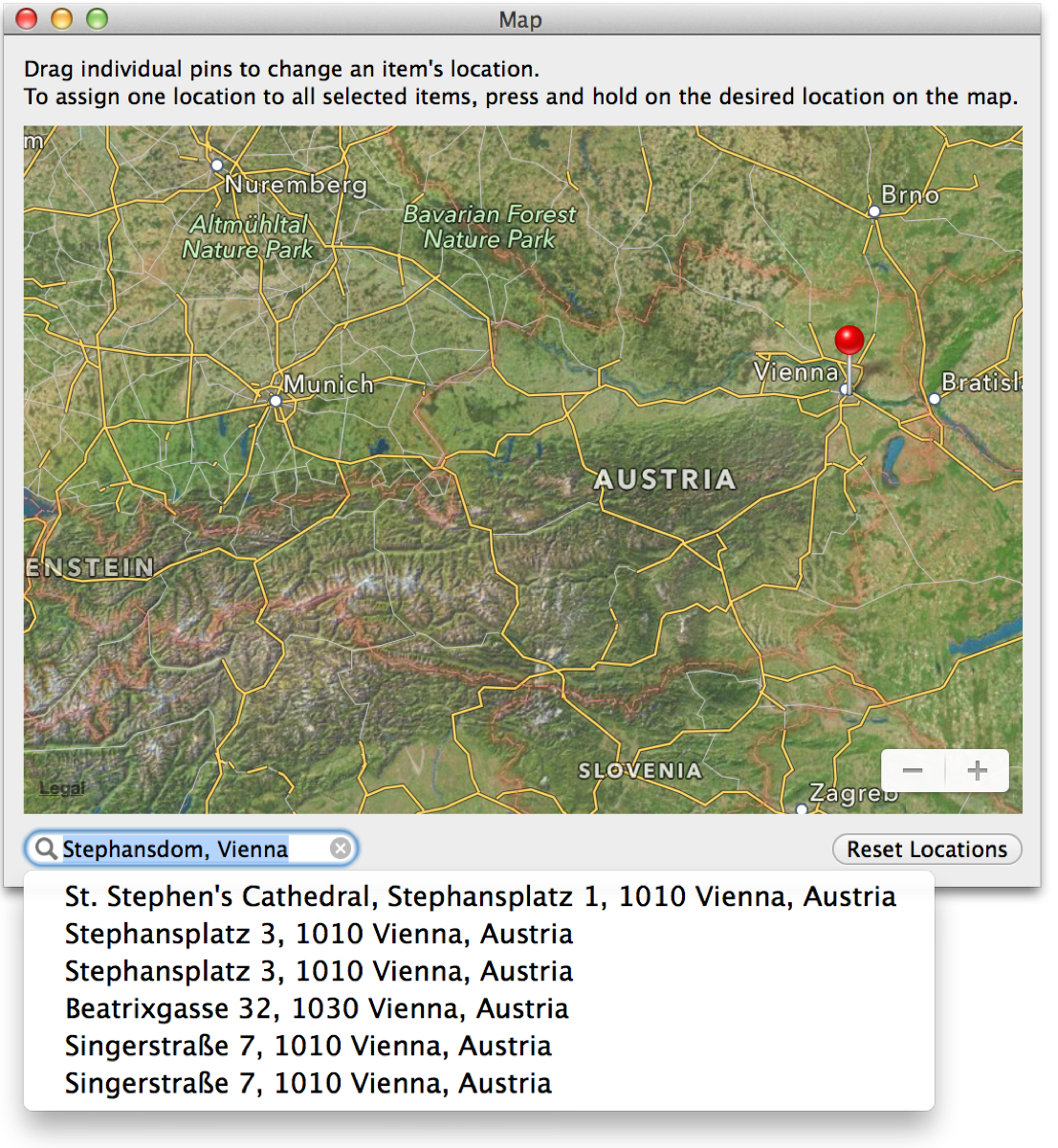
Screenshot of flickery  03 04 2014 18 20 01

The big improvement here is that you can now search for locations and flickery will reverse-geocode that info into a latitude/longitude pair that Maps can understand. If you have a camera without GPS and want to assign a specific location, this comes in very handy.

Sorting

I’m adding better sorting to flickery with version 2.0. As you can see in the screenshot below, you can sort by Date and Title (booooring) but also by location, for example, based on the distance from the selected item. Items without a location will be sent to the end of the list.
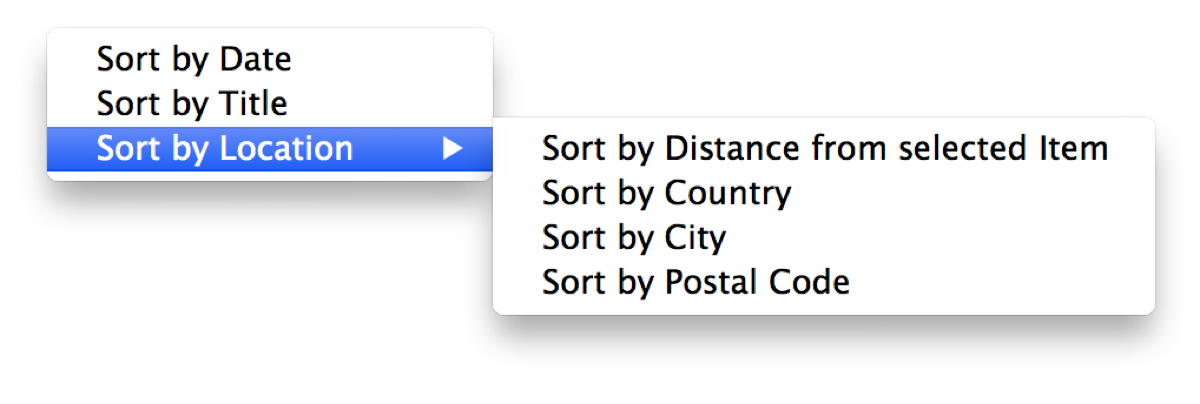
Screenshot of flickery  03 04 2014 18 26 00

Using Google’s Maps APIs (because Apple’s reverse-geocoding is a little bit limited), flickery will also let you sort by Country, City and ZIP/Postal Code.
This comes in very handy when you’re deciding which photosets to add to, for example, or just for the general order of the uploaded items and how they will appear on flickr.

Sadly, Google’s APIs are limited as well (2,000 requests per day per IP address), but it’s better than Apple’s limitation (which gives out after about 50 consecutive requests – bug report filed! – and yes, I am not geocoding all items at the same time but one after the other, as “demanded” in Apple’s CoreLocation documentation). But I don’t think too many will run into issues with that.

Filtering

Dealing with many items for upload, it can become overwhelming trying to keep track of everything. With flickery 2.0 I want to simplify that by implementing filters, so you can quickly view only photos or videos, items with or without description, tags, location and if you’ve assigned a photoset/group or not.
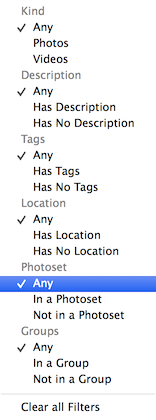
Menu

That wil make it easy for you to keep on top of everything and make sure you’ve done everything you had planned for your upload.

Importing unsupported files

Just like in flickery 1.x, flickery 2.0 will let you quickly convert RAW files (which flickr doesn’t accept) to JPEG files, trying to keep as much EXIF data as possible (which is new in 2.0).
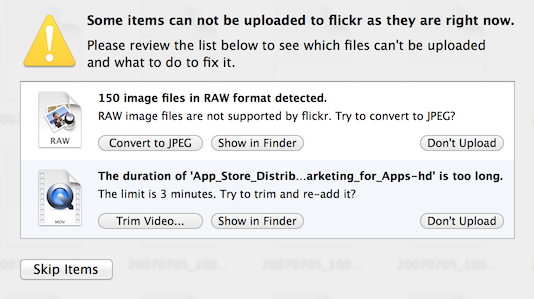
Import

Trimming videos has been in flickery 1.x as well, but is now done with AVKit instead of QuickTime and is quicker and more reliable. It offers the same trimming interface you already know (and hopefully, love) from QuickTime Player:
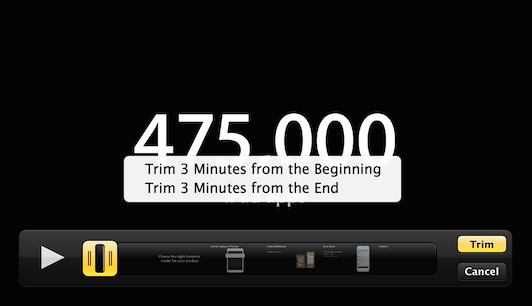
Trim

Editing

I’m not sure yet about how deep I want to go into editing (if at all) with flickery 2.0. I figure, most items will come from iPhoto or Aperture anyway, already post-processed by an app that can do it better and is focused on it more than flickery ever would be.

Perhaps I will include very basic editing functionality like rotating and mirroring, but I think that will be about it.

Quick Uploads

With all this detailed uploading stuff, there needs to be a way to quickly upload something into your stream, a photoset or a group.

So with flickery 2.0, when you drag an image- or video file onto your stream, a photoset or a group it won’t fuzz about and just directly, quickly upload it without you having to do anything else.


I think that’s it for this time, I’ll see you next time with some more insights on flickery’s development 🙂

Thank you for reading!
Take care and I hope to see you again next time 🙂

—-
My name is Matt, and I’m the developer of Eternal Storms Software. You can follow me on twitter here: [twitter-follow screen_name=’eternalstorms’ show_count=’yes’]

Read more

As I am now back working on flickery after a short hiatus – sometimes you need a little distance from a project to be able to reflect on it and maybe get a new perspective on some things, I figured I’d talk about the process as I am working on it, not after, in a so-called “post-mortem”, as my memory is now fresh and “in medias res”.

Before going into about what’s coming though, allow me to go back to see what’s been.

A New Beginning

Starting from scratch is usually admitting to having screwed up before. In flickery’s case, I wouldn’t say I screwed up completely. I am, however going to say that I could have done some things better. In some parts, a lot better.

Creation Date of flickery 1

I started developing flickery 1.0 in early 2008. That’s a long time ago. I’ve become (I hope) a better programmer with a deeper understanding of how things work and are supposed to work. I have (a lot) more experience in Cocoa and a better understanding of UX and UI. I don’t let myself get away with things that work ok but could be better that easily anymore.
This is a good time to start from scratch.

Why start from scratch?

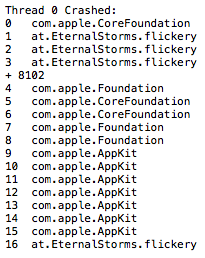
flickery 1 crashlog

They say the way your desk looks, your mind looks. If you apply that to the code base of flickery 1.x, you’d commit me. It is not a pretty sight.
It’s really hard to look at, it’s difficult to follow and understand… it’s a fine mess, to be honest.

So one part of the reason why I started from scratch is that I didn’t see the forest for the trees (the app for the code) anymore.

Additionally, things have changed a lot in OS X since 2008. Which makes version 2.0 a good point to get rid of all the legacy code (individual code paths for OS X Leopard and every iteration that came after) and create clean code for OS X Mavericks and newer. (Mavericks is a no-brainer, it’s a free upgrade, everyone should go and get it.)

There’s blocks, ARC and Objective-C 2.0, just to name few. Going back to flickery 1.0’s code and re-working all the parts might very well have taken just as long (if not longer) as starting anew. It was totally worth it.

New Back-End

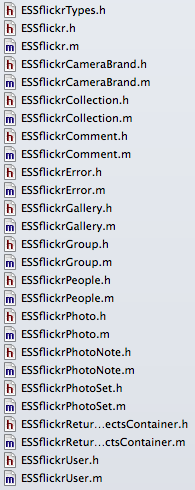
ESSflickr classes in flickery 2

Absolutely essential for flickery is it’s communication with flickr’s API. Incidentally, in flickery 1.x, that was the #1 cause of crashes and bugs.
I’m not going to tell you how I did it back then; it’s just too embarrassing.

This time around, I’m not making the same mistakes again (all the while hoping I’m not making any new ones).

Let’s just say, in the old backend, I handed NSDictionaries et.al. back and forth. I didn’t use any XML or JSON parsing, I did it all with NSString’s rangeOfString, etc., not always checking if a range existed before working with it. As I said – embarrassing.

So the first thing I did was switch from getting XML from flickr’s API to JSON and not parsing it myself, but letting the system do it. That’s a huge load off my mind right there.

Secondly, I’m done with handing NSDictionaries, NSArrays, etc., around. The new back-end returns proper objects that contain the necessary info in an easily accessible and understandable way.

There are a few Objective-C wrappers for flickr’s API out there, but I didn’t like any of them. They let you do this (pseudo-code)

NSDictionary *responseDict = [SomeFlickrWrapper executeMethod:@“flickr.photos.search” withParameters:someDictionary];

Aside from also handling OAuth and signing methods, etc., this is all they let you do. So you have to remember the methods, the parameters – it’s really not a wrapper, it’s an access point to the API.

What makes my back-end different is this:

- (ESSflickrGallery *)createGalleryWithTitle:(NSString *)title
description:(NSString *)description
primaryPhoto:(ESSflickrPhoto *)photo
error:(ESSflickrError **)alert;

You call the method and the back-end does all the parameter and method stuff for you. It’s much neater. In this example, you can also see the use of custom classes instead of dictionaries. ESSflickrGallery, ESSflickrPhoto and ESSflickrError are all wrappers for responses from the API, neatly packed up in an easily accessible class.

I guess I could have used one of the available back-ends as a back-end for my back-end, but I figured, if I’m going through the trouble of matching all available flickr-API-methods, I might as well do the OAuth and signing stuff myself as well.

This new back-end doesn’t only make things easier to develop, read and understand, it also improves the app’s stability and performance (mostly because it’s easier to develop, read and understand 😉 ).

As you can imagine, this has taken up the most time up until now. Now comes the fun part of using it to create the next version of the app.

I hope you’ll enjoy this upcoming series of posts about the development of flickery 2.0 and some of the design decisions behind it.

Upcoming in Part 2

In part 2, I’ll talk about uploading to flickr with flickery 2.0. Lots of suggestions will make it into the new version 😉

Thank you for reading. Enjoy your day!

My name is Matt, and I’m the developer of Eternal Storms Software. You can follow me on twitter here.

Read more

sandboxPhoto credit: livingindryden.org

I’m very excited about the new operating system and the APIs it holds for developers.

One new feature that is going to be very popular amongst users and holds real benefits for them is the App Sandbox.

What is App Sandbox?

Entitlements

Basically, the App Sandbox needs developers to specify what kind of access to user data an application they create needs.

You basically start with no privileges (so called “entitlements”) at all and work your way up for what your app needs. 
Does it have open or save panels? You need an entitlements for that.
Does it need access to the network? More entitlements.
Does it need to access iCal or Address Book? Even more entitlements.

Apple states there are currently 15 entitlements, but the list may change in the future.

Containers

For data saved by applications, like preferences files, Core Data storage, “Shoebox” data, basically everything except Documents the user saves or are autosaved by OS X Lion, each application gets its own Container in /Users/yourname/Library/Containers/, like /Users/matthias/Library/Containers/at.EternalStorms.ScreenFloat/

An application that has no entitlements for file system access can not access anything beyond that folder without the user’s consent (a user can give their consent with selecting files in open or save panels or by drag’n’dropping items onto or out of the sandboxed application).

Deny, deny, deny!

Anything an application requests it doesn’t have the proper entitlement for gets denied by a process called sandboxd, the sandbox daemon. It manages the sandboxed applications and their access to things they are or aren’t entitled to.

This is what your Console looks like when something gets denied:

27.07.11 16:56:14,480 sandboxd: ([2460]) screencapture(2460) deny file-read-data /usr/sbin/screencapture

XPC

XPC helps take the sandbox paradigm even further, making apps even more secure. Instead of having one executable that does it all (access the web, access iCal data, access Address Book data, write stuff to disk, read stuff from disk), a developer splits these tasks up and basically creates for each of these operations a executable with just enough entitlements to do its work.

So if you have an application that can access your Address Book and the web, there’s nothing from stopping the app, had it been compromised, from sending that data to a server.

However, if you have two different executables, one with just the Address Book entitlement and another with just network access, it’s not that easy anymore for intruders to do their dirty business.

XPC lets these two executables talk to one another, inside their shared sandbox.

What is App Sandbox good for?

Something that has been said a thousand times in the WWDC sessions to make abundantly clear what App Sandbox is good for:

It’s a last line of defense against evil-doers.

If an application has been compromised, it can’t do anything beyond its entitlements. That’s a very good thing.

So what does it all mean for users and developers?

Users

For users, it’s a great thing to have in terms of security and privacy of your data and I think every user should be excited about it. I know I am. It’s a great solution to a problem that has been dragging on too long, and Apple stood up and took a shot at it, and I think they did very well. For the most part.

In terms of what app developers will be able to make for those users, well, that’s another story which I’ll explain next.

Developers

In general, for most cases, developers won’t have any trouble with the App Sandbox. Version 1.2 of ScreenFloat – which is currently in Review for the App Store – already is a client of the sandbox and I ran into no trouble with adopting the entitlements, what so ever. It does what it does, just like before, but now, it’s safer, and I’m very excited about that.

What worries me, however, and, judging from what I’ve read on Apple’s developer forums, worries quite a lot of other developers as well, are the so-called temporary entitlements.

Temporary entitlements are for certain cases where it’s not really safe to do something, but Apple hasn’t figured out a safe way to let the app do it yet, so they made an entitlement for it. A temporary one.

Let’s take, for example, iTunes. There are a lot of applications out there that can “remote control” iTunes with global hotkeys.
In the background, the application is sending out an Apple Script, or doing its work over the Scripting Bridge, or are sending Apple Events directly (Apple Scripts and Scripting Bridge work with Apple Events in the end, but it’s at a higher abstraction level API wise for developers like me, who have no idea how to create Apple Events in the first place).

For this case, Apple has created a temporary entitlement. Alright, so it works.

What bothers developers however is the term “temporary”. What _is_ temporary, exactly? Will there be a replacement once the temporary entitlements vanish?

Let’s look at a perfect example for this:

GimmeSomeTune and the App Sandbox

Some of you might have read it on Facebook, others may have on twitter, for those of you who haven’t, here’s what happened:

I’ve halted development on GimmeSomeTune because of the temporary entitlements, more so because of the questions I asked above that have yet to be answered by Apple.

But let’s take it one step at a time:

GimmeSomeTune gets notifications with userInfo payload objects from iTunes. That’s no problem yet, since iTunes is yet to be sandboxed. But once it is, it can only send notifications without userInfo payload objects, and that object contains all the necessary information, like Title of Song, Album, Artist, etc.

So GimmeSomeTune, in its current form, could work for some time, until Apple decides to sandbox iTunes. Boom! Rien ne va plus.

GimmeSomeTune downloads artwork and lyrics and sends them to iTunes through the Scripting Bridge. The Scripting Bridge is essentially sending Apple Events to the app you target, in my case, iTunes.

The sandbox allows for Apple Events to be received by an application (without entitlements), but can not send any, without the temporary entitlement. When the entitlement is no longer valid, the main functionality of GimmeSomeTune breaks. Boom! Rien ne va plus.

So what it comes down to is this:

GimmeSomeTune would work right now in its current state, with temporary entitlements and hoping that Apple will never sandbox iTunes so it will continue to send notifications with userInfo payloads (which is doubtful, since iTunes is your digital hub and all, so they’ll be sure to sandbox it at some point, I guess).

But what happens if iTunes was sandboxed?
GimmeSomeTune would break, it would not know what song is playing in iTunes and hence wouldn’t download information and send it to iTunes, rendering the application useless.

And what if the temporary entitlements go away without a proper replacement API?
Again, GimmeSomeTune would break and it couldn’t send downloaded data to iTunes anymore, again rendering the application useless.

Why not just release it and hope for the best?

Sure, I could release GimmeSomeTune with temporary entitlements and hope they stay around forever or that there’ll be a replacement API for them.

But I have to consider what happens if they don’t (which is, in my opinion, 100% certain) – angry users, having paid for software that doesn’t do its job.

I am not willing to take that chance. I will wait to see what Apple comes up with.
And if there is a replacement for temporary entitlements in the works, and when I’m certain GimmeSomeTune will work with it, without the fear of having the application break at some random point in the future due to functionality that is ripped out from under it, only then can I release GimmeSomeTune with confidence and the knowledge that its users will be able to actually use the app.

And I believe this is the right choice.

Sandbox at its finest

Would you like an example of what kind of apps are completely unsupported in the sandbox environment?

Applications that change developer-signed files inside of app bundles that are a) developer-signed and b) running in the sandbox environment.

May I present the worst case Scenario: PresentYourApps

Some of you may know this little app of mine. PresentYourApps lets you hide the menu bar and / or dock for applications you specify, making more screen real estate available. Or at least, it _let_ you.

On OS X Lion, it works some of the time, but I highly discourage you from using it on that system, and I will take down the download link in the next couple of hours.

I discourage you, because it breaks apps you use it on.

I got an e-Mail from a user who tried it on Preview.app on Lion, and after he restarted Preview.app, it crashed on launch. Luckily, PresentYourApps keeps backups of the file it edits, so the user could make Preview.app work again, but it was scary.

Well, PresentYourApps has been long overdue and begging for an update, but because of these circumstances, I decided to discontinue working on it all together and removing it from my website, since it will do more harm than good on Lion systems.


If you have any thoughts regarding all of this, or GimmeSomeTune especially, please be sure to leave a comment or contact me in any other way!

Thank you kindly for reading,
Take care,
Matthias

[twitter-follow screen_name=’eternalstorms’ show_count=’yes’]

[twitter-follow screen_name=’flickeryapp’ show_count=’yes’]

[twitter-follow screen_name=’screenfloatapp’ show_count=’yes’]

[twitter-follow screen_name=’gimmesometune’ show_count=’yes’]

Read more