Apps

Yoink Promotion on TwoDollarTuesday

I’d like to quickly inform you that, as part of TwoDollarTuesday, I have a sale of Yoink going on right now.

Yoink is 72% off on the Mac App Store ($1.99 instead of $6.99) for a limited time.

Also, yesterday I released an update for it, bringing it to version 3.2.6, fixing an issue with Microsoft Outlook and the Dock. It also brings minor improvements in low-memory situations.

Links:
Yoink on the Mac App Store
Yoink Website / direct Demo download

I hope you enjoy it 🙂

Read more

Yoink Mac App Icon

I’m happy to tell you that today, Yoink 3.2.5 is available for download from the Mac App Store. It’s a free upgrade for everyone who’s purchased it before.
You can download a 15-day trial for the app here, even if you’ve tried it before.

What Is Yoink?

Yoink simplifies and improves drag and drop on your Mac.

Simplify.

It simplifies drag and drop by providing a temporary place for files you drag, so you can navigate more easily to the destination of the files. It’s especially useful when trying to move or copy files between different windows, Spaces or (fullscreen) applications.

Moving a file with Yoink

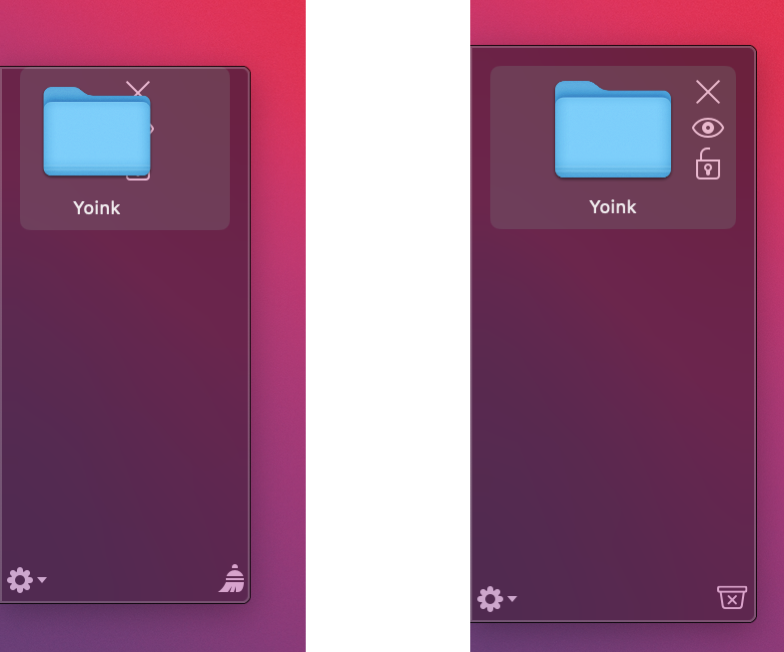
When you start moving a file in Finder, or app-content like an image from a website, Yoink appears at the edge of your screen, offering a temporary place for you to drag the files to. Without having to keep the mouse button pressed, you can now get to the destination of your file quicker and easier.

Improve.

Drag and drop is improved in several ways, including:

  • Collect multiple files from different locations you’d like to move to one destination without having to go back and forth
  • Split up a multiple-files-drag so you can move files to different places without having to go back and forth
  • Copy files to multiple locations more efficiently

Customize.

You can customize Yoink’s behavior so it fits in perfectly with your workflow. Aside from having to option to show it at either edge of your screen (at the top, center or bottom), you can set it up to only appear when you drag files to the edge of your screen or to appear directly at your mouse cursor when you start dragging, making drag and drop even faster.

Yoink appearing at the mouse cursor

For applications where you don’t need Yoink, add them to a “blacklist”, so Yoink doesn’t interfere with your work. A keyboard shortcut (by default, F5) lets you manually show or hide it, should you need it anyways.

What’s New in Yoink 3.2.5?

Version 3.2.5 improves support for photos dragged from Photos.app on macOS Sierra, reduces the app’s energy footprint and CPU usage during drags and improves the user experience throughout several parts of the app.
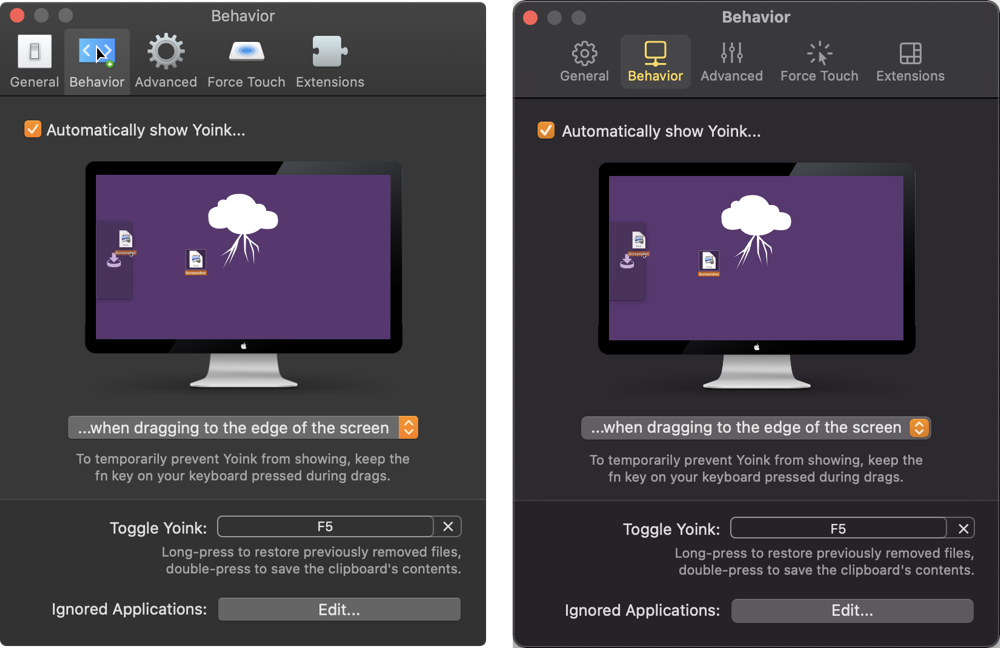
As a result of the discussion about disabled checkboxes being poor UX design (blog post), I updated Yoink’s “Behavior” preferences pane to have a more understandable UI:

Yoink 3.2.5's new Behavior preference pane

Further Improvements

  • Improved Yoink’s behavior if auto-recognition of drags is disabled
  • Force-Touch-To-Select-All-Then-Drag-Out is now a more pleasant experience
  • At first launch, Yoink now respects and reflects macOS Sierra’s “Reduce Motion” setting
  • Several bug fixes regarding QuickLook, Force Touch and file cleanup

Pricing and Availability

Yoink 3.2.5 is available for purchase on the Mac App Store for the price of $6.99 / £4.99 / €6,99. It is a free update for existing customers of the app.
You can download a free, 15-day demo version here, even if you’ve tried Yoink before.
Yoink runs on Macs with OS X Lion 10.7.3 or newer. OS X Yosemite or newer is recommended.

If you’re interested in writing about Yoink, you can download the press kit here, which contains screenshots, links to a short video and further information. Promo codes are available to members of the press at press (at) eternalstorms (dot) at.

Yoink Usage Tips

To get the most out of Yoink, I’m collecting useful tips and tricks for you on this website.

I’m looking forward to hearing from you and to see what you think about Yoink v3.2.5. If you like the app, please consider leaving a little review on the Mac App Store, it would help me out a lot! Should you have trouble with it or have any feedback or questions, please be sure to get in touch, I’d love to hear from you! Thank you.

Eternal Storms Software Logo

– – – Do you enjoy my blog and/or my software? – – –
Stay up-to-date on all things Eternal Storms Software and join my low-frequency newsletter (one mail a month at most).
Thank you 🙂

Read more

Translating your app into different languages is becoming more and more important. And articles like this one (techcrunch) seem to confirm that.

With Yoink 3.0 (mac app store, website), I localized the app into Japanese, Simplified Chinese, French, Portuguese (European and Brazilian), Korean and Italian (in addition to the languages that existed from the start: English and German).

Yoink In Brazilian Portuguese

Yoink in Portuguese

Here’s how revenue of Yoink increased a month after its 3.0 release (compared to the month before):

  • Japan: 305%
  • France: 212%
  • China: 144%
  • Portugal: 120%
  • Italy: 80%
  • Canada: 76%
  • Brazil: 45%
  • Belgium: 37%
  • South Korea: 16%
  • Switzerland: 4 %
There are great services available to help you: iCanLocalize, Gengo, wordcrafts, brlingo, just to name a few.
Yoink in Japanese

Yoink in Japanese

So, if I have one tip for you today, try to localize your apps at least into Japanese and Chinese – it will be worth it.

Eternal Storms Software Logo

– – – Do you enjoy my blog and/or my software? – – –
Stay up-to-date on all things Eternal Storms Software and join my low-frequency newsletter (one mail a month at most).
Thank you 🙂

Read more

ScreenFloat Mac App Icon

Today I finally was able to release ScreenFloat 1.5.13 on the Mac App Store. It’s a free update for existing customers of the app.
A 15-day trial can be downloaded for free from the website, even if you’ve tried it before.

What Is ScreenFloat?

ScreenFloat lets you create screenshots that float on top of everything, enabling you to keep an eye on information you currently need without having to switch back and forth between windows, applications or spaces.

Customers use it in all sorts of cases – when coding for code snippets, when making wire transfers for IBAN numbers and such, when working in Photoshop to compare images, the list goes on and on.

ScreenFloat in Action

Basically, any time you need to keep something in your field of view or need to remember something on screen, ScreenFloat is there for you. The floating shots follow you around, no matter what window, app or space you are in, or you can pin them to specific spaces.

Shots you close are not deleted, but kept for you in the Shots Browser, where you can organize and categorize them:

ScreenFloat's Shots Browser

What’s New in ScreenFloat v1.5.13?

• Most importantly, ScreenFloat now works on macOS Sierra.
As I wrote about earlier, macOS Sierra has a new sandbox entitlement that was prohibiting ScreenFloat from performing correctly, so that is fixed now.
While I was at it, I put the screenshot creation into its own XPC process, so I could isolate the new entitlement from the rest of the app, as Apple encourages doing.
• Aside from now working on macOS Sierra, it fixes two bugs and a (rare) crash, so I definitely recommend updating to version 1.5.13.

A Little Background on ScreenFloat’s App Store Review

When I first submitted this update of ScreenFloat to the Mac App Store, I included this line in is App Store description:
“Improves compatibility with macOS Sierra”
The update was rejected because of it. You are not allowed to mention Apple pre-release software in your App Store description. Instead, they suggest you use this line:
“Improves compatibility with an upcoming OS”
I think that’s rubbish. Everyone knows what the next OS is going to be called – it was publicly unveiled already under that name, so the likelihood of it changing now is virtually zero.
Secondly, they have a public beta out, for crying out loud. It’s in peoples’ hands already, but they don’t want developers to let their customers know that the app now works on Apple’s latest and greatest new system?
So I sent an appeal to the Review Board, it got rejected, I submitted the app again with the suggested line and it went through.
Still, I don’t think “an upcoming OS” is helping anyone. In fact, it’s more confusing than anything, if you ask me. “An upcoming OS” is ambiguous, whereas “macOS Sierra” lets the user know exactly what you mean.
Anyway, this will be my process from now on: Submit with my original line mentioning the OS update explicitly, getting rejected, appealing and then submitting with their suggested line. Perhaps they’ll get tired of it and let it through at some point. Probably not, though.

Pricing and Availability

ScreenFloat v1.5.13 is available for purchase on the Mac App Store for the price of $8.99 / £6.99 / €8,99. It is a free update for existing customers of the app.
A 15-day trial can be downloaded for free from the website, even if you’ve already tried the app.
ScreenFloat runs on Macs with OS X Lion 10.7.3 or newer.

If you’re interested in writing about ScreenFloat, you can download its press kit here, which contains screenshots, icons, a short sample video and further information.
A limited amount of promotional codes are available to members of the press at press(at)eternalstorms(dot)at.

Links

ScreenFloat Website
http://eternalstorms.at/ScreenFloat

ScreenFloat on the Mac App Store
https://itunes.apple.com/app/screenfloat/id414528154?mt=12&at=1001l8pT&ct=blog

ScreenFloat Demo Download
http://eternalstorms.at/ScreenFloat/ScreenFloat.zip

ScreenFloat Press Kit
http://eternalstorms.at/press/ScreenFloat-1-Press-Kit.zip

ScreenFloat Video Preview on YouTube
https://youtu.be/MYtEzOP41Os

I’m looking forward to hearing from you and to see what you think about ScreenFloat 1.5.13. If you like the app, please consider leaving a little review on the Mac App Store, it would help me out a lot! Should you have any feedback or questions, please be sure to get in touch, I’d love to hear from you! Thank you.


Eternal Storms Software Logo

– – – Do you enjoy my blog and/or my software? – – –
Stay up-to-date on all things Eternal Storms Software and join my low-frequency newsletter (one mail a month at most).
Thank you 🙂


Read more