App Store

I fancy myself a calm and collected person. Mellow. Only very few things on this good earth rile me up enough to make me want to punch my Mac’s screen. But boy, is Apple’s App Review consistently one of them.

Prologue

I recently released ScreenFloat v2.3.8. I submitted it to the Mac App Store on July 16th, 2026, and later that day, it was reviewed and approved by App Review without any issues. I published it on July 20th.

As sometimes sadly happens though, right after the release, I noticed a crashing bug. It’s sort of obscure, but prominent enough that I would have been uneasy had I not fixed it right away. I’ll skip over the part where I panic and curse myself for missing it – that’s my own personal hell.
I fixed the bug (one line of code!) and re-submitted to Apple with an expedited review request, which was granted.

Chapter I – The Devil Is In The Details. But Where Are They!?

The update eventually entered review and was fairly soon afterwards rejected for the following reason:

This is an automated message. The review of this submission cannot proceed. See below for more information.

An automated analysis of the submission indicates the app includes placeholder or otherwise insufficient purpose strings.

Purpose strings must clearly and completely describe your use of data.

Take one of the following actions:

- If the app needs access to a protected resource that requires a purpose string, revise the purpose string to explain how the app will use the resource and provide a specific example of how the data will be used. Then resubmit for review.

- If the app does not need access to a protected resource that requires a purpose string, remove the code that’s accessing the resource and the purpose string from the binary. Then resubmit for review.

Aside from the fact that it took me a second to understand what the automated message (a first for me, by the way) meant by “purpose strings”1, I was flabbergasted.
Which purpose string does the automated process deem “insufficient” or a “placeholder”?
What does “insufficient” even mean here? Is a purpose string not clear, or too short, or not easily understandable? Is it grammatically incorrect? Is it in a localization, or the English language version?
What’s a “placeholder” considered to be in this context?
Is it objecting to my use of the protected resource, or my user-facing sentence?
Which protected resource is it objecting to in the first place?

It’s painfully ironic that they require my strings to “clearly and completely describe” my use of data, when they themselves so marvelously fail to do so.

You know what’s “insufficient”? Your freaking automated message!
They might as well have told me “Something’s preventing us from further reviewing your app. Good luck finding it, asshole!”.

Even if I only had one purpose string in my app, this would have been annoying, because that detail would help quite a bit in knowing where to look and what to change.
But I have several of them. ScreenFloat is a screen capture app, so it can record your screen, and, if you tell it to, your microphone and system audio. (And, if you enable it, your key strokes during recording, but that doesn’t need a “purpose string”.)
In addition to those, the app has a Face ID purpose string, because folders in ScreenFloat can be locked and unlocked with biometrics. It has a Pictures folder purpose string for the specific case where a v1-library-import fails for certain files, so the app can move those there.
It has an Apple Events purpose string so the app can use and interact with Shortcuts. Lastly, it has a Contacts purpose string, because ScreenFloat can Quick Look vcards encoded in QR codes, and that only works with that Contacts entitlement, otherwise no preview is shown, or worse, the app crashes. Don’t ask me why.

Long story short, ScreenFloat needs all those purpose strings, and I believe they are worded correctly. After all, they have been like this ever since they first shipped.

So I reworded two purpose strings to demonstrate goodwill, and re-submitted.

Chapter II – They’re Just Trying to Break Me Now

Another rejection. This time from an actual person. Or so I believe. It didn’t say “automated message” this time around. I’m not sure if getting escalated from an automated rejection to a human one is reason to rejoice, or to worry even harder. But I digress.

The rejection this time was much clearer, but just as infuriating.

The app uses one or more entitlements which do not appear to have matching functionality within the app.
[…]
com.apple.security.personal-information.addressbook

I see.
Apparently, App Review completely ignored – or is ignorant of – the fact that in App Store Connect2, there’s a section called “App Sandbox Information”, specifically designed for the purpose of telling App Review what entitlements your app uses, and why.
I have this. See here:
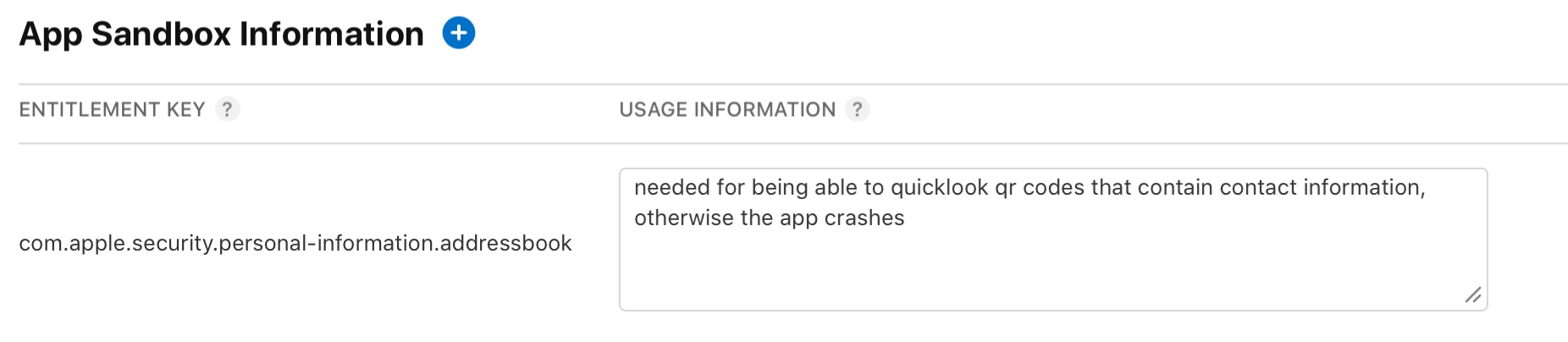
So pardon my French, but it’s freaking right there.

But I did as they did, and ignored this.
I gave them the same (paraphrased) reason via reply-to-the-rejection, and now the app is “Waiting for Review” again. What a waste of time.

Epilogue

I cannot stress enough how frustrating these inconsistent app reviews are.
If you recall from the beginning of this post, just 5 days ago, on the 16th, I submitted basically the same binary, and it went through without a hitch.
Now, a few days later, with a one-line change in the binary to fix a crash, I have two rejections for stuff that has been in the app since I can’t even remember when.

What gives, App Review?
Why waste my (and your) time with asking for info on an entitlement, when it’s already there?
Why not object to it at the very first review of that entitlement with v2.0, instead of out-of-the-blue, after goodness knows how many updates in between?
What’s with that absolutely disgusting and disrespectful automated message with no details whatsoever?
What happened between July 16th and today, five days later!?

And most importantly of all: why won’t you let me release my one-code-line-crash-fixing app update for ScreenFloat already!?

[Update]: ScreenFloat v2.3.9 was accepted by App Review on July 22nd and subsequently released.

[Update]: Apple called. And now I feel bad. I hope it was clear that I’m upset with the process, not the people behind it.


  1. A “purpose string” is the text displayed to users for requesting protected resources, like the microphone, camera, etc.
    There should be a different term for this than “purpose strings”. How about “Usage Description string”, since that’s how they’re defined in code, like “NSMicrophoneUsageDescription”? That would make it way more recognizable to developers. ↩︎
  2. The place where developers submit their apps to App Review. ↩︎

Read more

Tameno for Apple Watch, iPhone, iPad, Mac and Apple TV helps you stretch, brush your teeth, do exercises, water your plants, meditate, box-breathe, do yoga, and so much more, with auto-repeating timers. Set an interval, and it’ll inform you every time it elapses.
Version 1.3 adds Traditional Chinese localization and improves adds handy tips.

This app is perfect for timing my tooth brushing, slow reps in the gym etc!

J4R3D2013, App Store

What is Tameno?

I have an electric toothbrush. It has a built-in 30sec timer, so I can brush each quadrant of my teeth for the same amount of time. But what about each side of each quadrant? I needed a 10-second self-repeating interval that would tell me to move on. That’s where the idea for Tameno came from.
Now, I just start Tameno at a 10 second interval, and until I’m done brushing, it’ll let me know that 10 seconds have passed continuously. Perfect. Now I can also do my stretches without having to count in my head, or water my hedge-plants for the same amount of time. Bliss!
With widgets on your lock screen, home screen or in Control Center, and custom shortcuts in the Shortcuts app, your favorite intervals are always just a tap away!

Excellent tool!

Sevikha, App Store

What’s New in Tameno v1.3

  • Adds tips to help you get the most out of the app
  • Adds Traditional Chinese localization

👉 For the full release notes, please click here 👈

I’ve been looking for exactly this […] Genius!

mosch123, App Store

Links and Availability

Tameno is a one-time lifetime universal app purchase at USD/EUR/GBP 3.99. That means you purchase it once (on the store of your choice), and are then free to use it on your Apple Watches, and iPhones, and iPads, and Macs, and Apple TVs.
The app requires macOS 13, iOS 16, watchOS 9.4 and tvOS 16 or newer and is currently localized into English, German, French, Italian, Spanish, Portuguese (Brazil), Dutch, Japanese, Korean, Simplified and Traditional Chinese, Russian and Hindi.

➡️ Website

🖥️ Mac App Store
📱 iPhone App Store / iPad App Store
⌚️ watchOS App Store
📺 tvOS App Store

💡 Get to Know Tameno (User Guide)

💌 Contact & Connect

*The* app for the gym. Perfect for resting timers, and much faster than setting a timer.

Lexada9, App Store

If you have any feedback or questions, please don’t hesitate to use the contact link above, or below : )
Have a great day, and thank you for stopping by.


Read more

Today I released Tameno v1.0.3, and it comes with a ton more intervals, “Count to zero”, and more.

What’s Tameno?

Tameno informs you about the elapsing of an interval you give it.
Say you want to water all your plants for the same duration: set a 20 second interval, and Tameno will tap you every 20 seconds.
Or you want to brush each side of every quadrant of your teeth evenly: set a 10 second interval, and Tameno will tap you every 10 seconds.
Or you’re doing stretches and want to do them for the same amount of time: set a 15 second interval, and Tameno will tap you every 15 seconds.

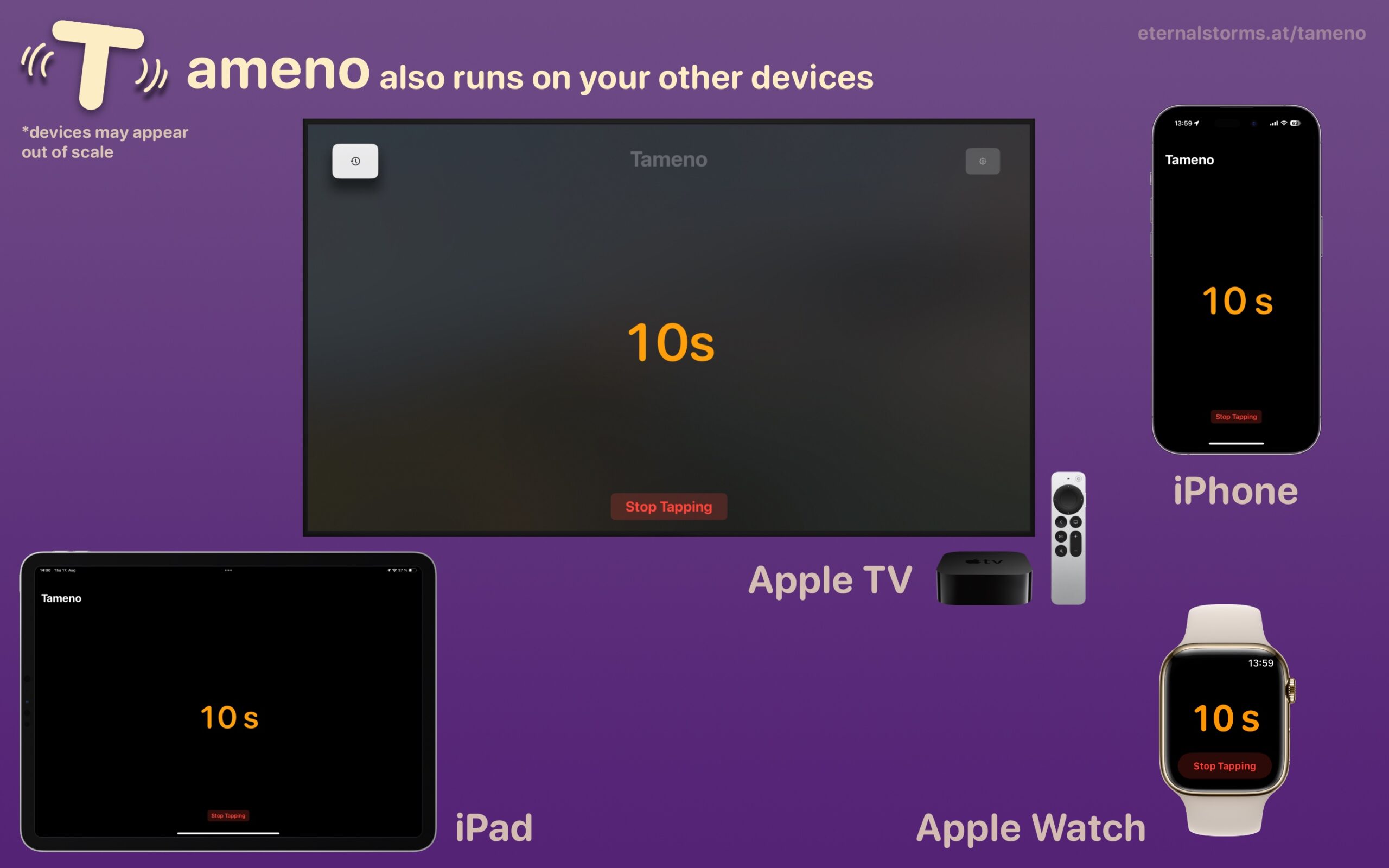
It’s a universal app that is available for your Apple Watch, iPhone, iPad, Mac and Apple TV!

Features vary from platform to platform, naturally:
The Apple Watch taps you when the interval elapses.
The iPhone vibrates, optionally plays a sound, and optionally flashes the screen.
The iPad, Mac and Apple TV play a sound and optionally flash the screen(s).

What’s New in Tameno v1.0.3?

Most importantly, instead of intervals between only 2 and 60 seconds, you can now choose between 2 seconds and 20 minutes! That’s a whopping 3.400% increase in intervals. And it’s a completely free upgrade. Wow!

With that increase in intervals, I found it necessary to have a faster way to set them up. So to change the interval by seconds, you just scroll up/down or left/right like before. If you want to do it by minutes, you can instead tap-drag. Here’s a short video of it in action:

Some users have expressed their wish that Tameno would count to 0 instead of 1, so I’ve implemented just such a setting.
Instead of 3 > 2 > 1 >> 3 > 2 > 1, a 3 second interval will count 2 > 1 > 0 >> 2 > 1 > 0 with it enabled:

Links and Availability

Tameno is exclusively available on the App Stores for Apple Watch, iPhone, iPad, Mac and Apple TV.
It’s a universal one-time purchase, for USD 3.99 / EUR 3,99 / GBP 3.99.
Tameno is currently available in English and German and requires watchOS 9.4, iOS 16.6, iPadOS 16.6, macOS 13.5, or tvOS 16.6.

Tameno Website
Tameno on the Mac App Store
Tameno on the iOS App Store
Tameno on ProductHunt


Enjoy : )
If you have any feedback or questions, feel free to contact me – I’m looking forward to hearing from you.


Read more

Yoink v2.3 for iPad and iPhone is now available on the App Store and brings a couple of neat new features for users of iOS 15 and iPadOS 15.

Yoink is a file- and snippet “shelf”, in a “hold this for me while I do something else for a while” sort of way.
Anything you can drag, copy, share or download, you can store in Yoink.
When you eventually need it, you can access files either directly from within the app, Yoink’s custom keyboard, and Siri Shortcuts. It also syncs across your iOS devices via iCloud.

First things first, with this update, I’ve decided to drop support for iOS 11, up to and including iOS 13, and will only support iOS 14 and newer going forward. After taking a look at the app’s usage statistics Apple provides on App Store Connect, having Yoink support iOS all the way back to version 11, which I did up until today, doesn’t make sense anymore.

What’s New in Yoink v2.3 for iPad and iPhone [on iOS 15]

+ Picture-in-Picture, with a twist.
With Yoink’s Picture-in-Picture you can, of course, play videos.
But you can also show websites, images, texts, eMails and PDFs in PiP.
Below are two videos showing a website being scrolled in PiP, and images being shown in PiP.

A website being opened – and scrolled – in Yoink’s Picture-in-Picture mode. Scrolling also works in text-, eMail- and PDF files.
Images being shown in Yoink’s Picture-in-Picture mode.

Now, you might ask, as I have when I first came up with the idea: “Isn’t this what Slide-Over is for, or Side-by-Side?”.
Well, yes. Until you’ve used this.
If you need an overlay wherever you currently are, not wanting to worry about having to manage the Slide-Over app when switching between full screen apps, this comes in very handy. I haven’t used it for a long while yet (this feature is internally maybe two weeks old), but I’ve been using it daily ever since. It also focuses entirely on the content it displays, without the app’s UI taking up screen space.

+ Support for Quick Notes
Select a file in Yoink and you’ll be able to reference it in a Quick Note, as you can see in the video below.

+ Mouse/Trackpad Band Selection on iPad
A minor improvement, but still very useful, you can now draw a rectangle around files to select them if you’re using an iPad with a mouse or trackpad.

+ Inter-app Drag and Drop on iPhone
Not really a new feature of Yoink itself, but of iOS 15 in general is drag and drop of content between apps.
This makes Yoink’s keyboard on iPhone now on-par with the iPad version, because now you can drag content from Yoink’s keyboard directly into the text area; no copy-paste necessary.

What’s New in Yoink v2.3 for iPad and iPhone [aside from iOS 15-only features]

+ Improved Info Panel
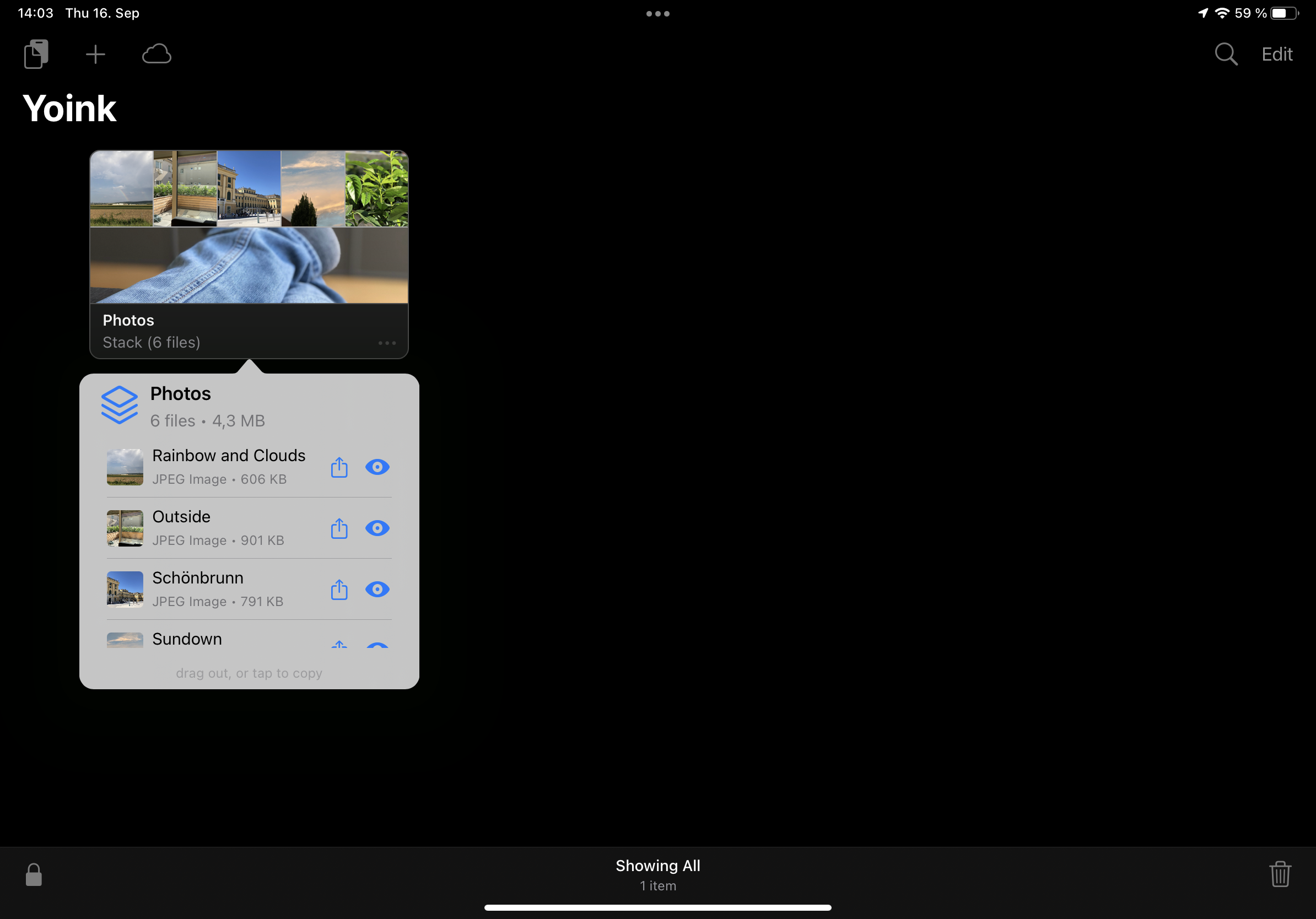
I’ve improved the Info panel, especially for Stacks. Instead of just showing the size of the Stack, you now have quick access to all files contained within it, which you can drag out, copy, or share right away.

The improved Info panel for Stacks now shows the files contained within, which you can drag out, copy or share right away.

On iOS 15, the Info panel, depending on whether you’re using the app in full screen or not, is now presented as a sheet, allowing you to view more content at once.

The Info Panel as a sheet on iOS 15.

+ Audio can now continue playing in the background
+ Yoink now appears in “Open In” dialogs
+ Many, many performance-, compatibility- and reliability improvements
+ Even more bug- and crash fixes

Where can I get Yoink?

Yoink is available for iPad and iPhone on the App Store; it’s a one-time purchase of $5.99 / € 5,99 / £ 4.99.
It requires iOS 14 or newer. To sync across your iOS devices, an iCloud account is required.

Yoink is also available for Mac on the Mac App Store.

Further Links

Yoink for iPad and iPhone Website | Yoink on the iOS App Store
Yoink for iOS Usage Tips
Yoink for iOS Press Kit (.zip download)

Yoink for Mac Website | Yoink on the Mac App Store
Yoink for Mac Usage Tips
Yoink for Mac Press Kit (.zip download)

Read more