
Announcements

flickery v1.9.51 – the full-featured flickr client for Mac – is now available and fixes a potential crash when downloading and uploading photos.
The app is now *free*, as I consider the app on “life support”, meaning that it’s horribly outdated (its first public beta was in May 2008 😱) and not going to receive substantial updates anymore (apart from the odd maintenance update here and there, like today’s).
The app is still fit for purpose and continues to provide a great way to browse and use flickr, but because flickr’s APIs have been at a standstill for a long time (even after being bought by SmugMug in 2018), I currently don’t see myself investing too much more time into the app.

The reason I updated it now is that I wanted to use it to download NASA’s images from the recent Artemis II mission, but couldn’t because the app crashed.


What is flickery?
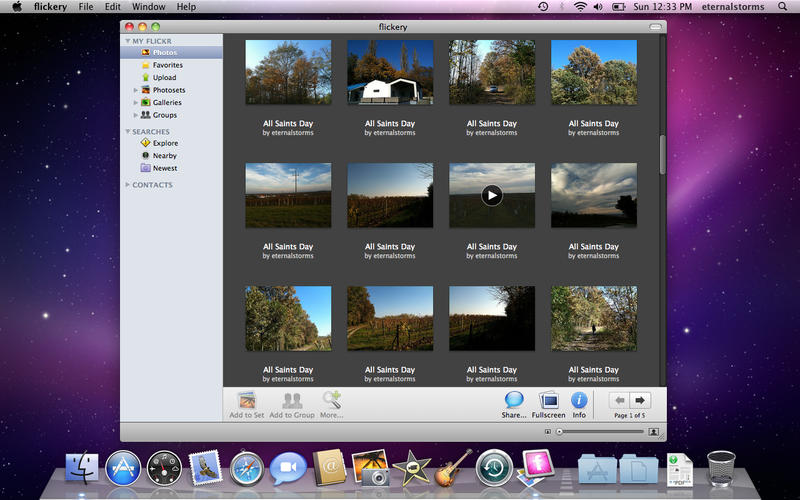
flickery lets you manage your flickr photostream, albums, groups, galleries, favorites and contacts with the ease of use of macOS, and the comfort of drag and drop.


What’s New in flickery v1.9.51?

  • Fixes a crash that could occur trying to download photos
  • Fixes a crash that could occur during upload

Links and Availability

➡️ Website

❗️flickery is now free for download from the Mac App Store.
The app requires macOS Yosemite 10.10 or newer and is localized into English and German.

🖥️ Mac App Store (free)

💌 Contact & Connect


If you have any feedback or questions, please don’t hesitate to use the contact link above, or below : )
Have a great day!
Read more

icloudPhoto credit: geeky-gadgets.com

iCloud is a big deal for me, and, I believe, for lots of other developers out there as well. Syncing data has become a lot easier with this new service and the according APIs. I once took a glimpse at the MobileMe syncing APIs and my head still spins a little.

What does it mean for flickery?

I’m still thinking of the implications for flickery. I got some nice ideas from users of flickery on twitter and I’m already looking into what is possible and makes sense in terms of flickery.

I could see flickery syncing the items yet to be uploaded or loocking into iCloud’s photo queue and offer an option to upload those items or at least present them in some way in flickery’s upload view.

What does it mean for ScreenFloat?

For ScreenFloat, In a nutshell, it will sync your shots between your devices (I don’t know if a iPhone/iPad version of ScreenFloat is useful, but I’m certainly entertaining the idea of having the shots on, say, your iPad, as well).
It will sync which shots are currently open and floating, which are hidden, which are in your shots browser, it will sync your categories in your shots browser, and their contents.

This is something I wanted to do from the beginning and I’ve been looking into services like DropBox to implement it. Now with iCloud (and yes, I realize it’s still a few months away) it’s even easier, faster, more reliable and more secure to implement.

What does it mean for GimmeSomeTune?

I don’t believe GimmeSomeTune could have any advantages of iCloud in terms of sync. If you find one, leave a comment or write me an e-Mail 🙂

Upcoming Stuff?

I have an upcoming app where iCloud will be perfect and will replace a server-client environment with tedious networking stuff. Stay tuned on that 🙂

[Update (18.06.2011)]

My good friend and honored developer colleague Christian Kienle wrote about the impact that iCloud may have on his applications on his blog.
It’s an interesting read, especially if you’re interested in how you will benefit from iCloud in the near future.

[twitter-follow screen_name=’eternalstorms’ show_count=’no’]
[twitter-follow screen_name=’screenfloatapp’ show_count=’no’] 
[twitter-follow screen_name=’flickeryapp’ show_count=’no’]

Read more

Thanks to your feedback, I’ve reached a decision on the Mac App Store which I think is fair and I’m pretty sure you will like as well.

Result of earlier blog Post

In an earlier blog post I asked you if you were ok with flickery being Mac App Store exclusive with version 2.0 where you wouldn’t be able to receive the discount I promised you when you purchased flickery 1.x

Responses have been generally very positive, I’m glad people are very accepting of the Mac App Store and my wanting to move my apps there.

However, I did think of a way where existing customers wouldn’t lose their discount.

flickery on Mac App Store decision

  • flickery will be released these days (once it’s been positively reviewed by Apple staff) on the Mac App Store in version 1.9.21
    Version 1.9.21, which brings a few fixes, will be available for non-Mac-App-Store customers as well.
    It will be priced at €18.99, nearly exactly the same as on the website.
  • Updates up until version 2.0 will be available for Mac App Store users and non-Mac App Store users alike.
  • flickery 2.0 will be Mac App Store exclusive
    Once version 2.0 is released, it will be offered at a discount, as promised to my existing customers so they can easily transition to the Mac App Store version.
    flickery 2.0 will be a free update to users who purchase flickery 1.9.21 or later on the Mac App Store.

I hope you like this solution, please let me know in the comments.

[twitter-follow screen_name=’eternalstorms’ show_count=’yes’]

Read more