drag and drop

Yoink for iPhone and iPad is your files and snippet shelf for anything you can drag, copy, share, or download. Version 2.5.4 improves its Files app integration, cleans up the UI a bit and makes a bunch of improvements and fixes.


What is Yoink?

Yoink for iPhone and iPad stores anything you can throw at it: file drags, content like images or text, eMails, downloads, and more.
It syncs across your iOS devices.
It can automatically store anything you copy – even if Yoink is in the background – with its Picture-in-Picture Clipboard Monitor.
It lets you “pin” PDFs, eMails, Websites, Images, and more in Picture-in-Picture for reference in any app.
It integrates with your Files app.
It lets you build powerful Shortcuts.
It’s there when you need it.


What’s New in Yoink v2.5.4?

  • In the Files app, Yoink now only shows the highest-fidelity representation of a file instead of all of them1, making it easier to navigate and select files
  • New contextual menu items in the Files app allow you to copy the contents of a file (as opposed to the file path), or a plain text representation of rich text formats
  • The stability and performance of the app have been improved, while fixing a few bugs and UI issues

🔗 For the full release notes, please click here.


Links and Availability

➡️ Website
📱 App Store (one-time lifetime purchase)

Yoink for iPhone and iPad is currently localized into English, German, Japanese, Simplified Chinese and Korean

💡 Usage Tips

💻 Yoink is also available for Mac (separate one-time lifetime purchase)

💌 Contact & Connect


If you have any feedback or questions, please don’t hesitate to use the contact link above, or below : )
Have a great day.


  1. For instance, a rtf “rich text” file in Yoink has its rich text data representation, as well as a plain text one. Previously, Yoink would show this file as two files inside a container folder in Files.app, now it’s one file: the rtf. ↩︎
Read more

Yoink for Mac drastically improves and simplifies drag and drop on the Mac. Now in version 3.7, it does it even better – many improvements and bug fixes make sure of that.


What is Yoink?

Yoink is a temporary place for your file drags. Whether you want to collect images from a website, text snippets from a document, or move files around in Finder, Yoink offers a “shelf” you can place them in so you can move freely to the files’ actual destination. It can hold virtually anything you can drag and appears whenever you start to drag something. It’s also highly customizable to fit your needs. It also comes with a clipboard history, easily accessibly via widgets, or the “shelf” itself.


What’s New in Yoink v3.7?

  • Yoink now automatically hides again if it was hidden before a drag
  • The app is now more responsive and stable
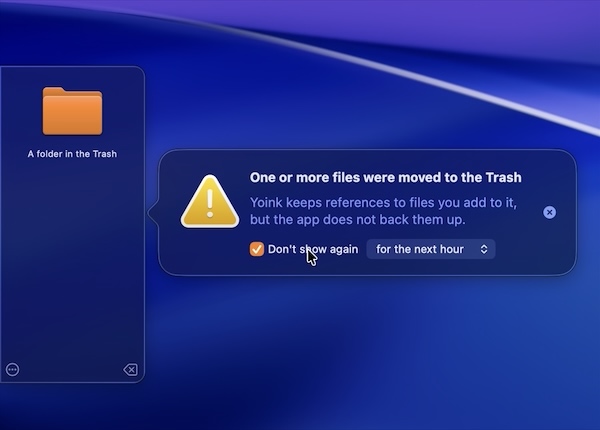
  • The “File in Trash” popover can now be muted
    • Additionally, a Trash icon is now shown for files currently in the trash
  • Improves support for drags from private Firefox windows
  • Improves support for drags from Transmit
  • Updated the UI
  • Increased the number of copied items the clipboard history can hold
  • Improves behavior when screen changes occur
  • Fixes a bug where Yoink would hide even though a file was just dropped onto it
  • Fixes potential issues with Quick Look, Continuity Camera and the Clipboard History widget
  • Finally removed the experimental “resolve alias” option. While it did resolve alias files, the resulting path was no longer usable by Yoink on newer versions of macOS
  • and much more!

🔗 For the full release notes, please click here.


Links and Availability

➡️ Website + free, 28-day trial + Direct Purchase
🖥️ Mac App Store (one-time lifetime purchase)
🔁 Setapp (also has my apps ScreenFloat and Transloader, plus over 250 awesome apps with one subscription, 7-day trial)
Yoink for Mac is currently localized into English, German, French, Italian, Portuguese, Japanese, Simplified Chinese and Korean
💡 Usage Tips

📱 Yoink is also available as a separate purchase for iPhone and iPad

💌 Contact & Connect


If you have any feedback or questions, please don’t hesitate to use the contact link above, or below : )
Have a great day.

Read more

Yoink for Mac, my app that drastically simplifies drag and drop, is now available in v3.6.104, fixing a bunch of bugs and minor issues. Also, in addition to being available on the Mac App Store and Setapp, it is now available for purchase directly from my website (joining ScreenFloat and DeskMat).


What is Yoink?

Yoink is a temporary place for your file drags. Whether you want to collect images from a website, text snippets from a document, or move files around in Finder, Yoink offers a “shelf” you can place them in so you can move freely to the files’ actual destination. It can hold virtually anything you can drag and appears whenever you start to drag something. It’s also highly customizable to fit your needs.


What’s New in Yoink v3.6.104?

It isn’t a sexy release, but a good one nonetheless, fixing a bunch of bugs and minor issues, like the shelf sometimes not appearing in different spaces, and improved Force Touch handling.
It now also shows release notes in-app and allows for completely voluntary in-app tipping. The app remains a one-time lifetime purchase, and the update is free for existing customers.


Links and Availability

➡️ Website + free, 28-day trial + Direct Purchase
🖥️ Mac App Store (one-time lifetime purchase)
🔁 Setapp (also has my apps ScreenFloat and Transloader, plus over 250 awesome apps with one subscription, 7-day trial)
Yoink for Mac is localized into English, German, French, Italian, Portuguese, Japanese, Simplified Chinese and Korean
💡 Usage Tips

📱 Yoink is also available as a separate purchase for iPhone and iPad

💌 Contact & Connect


If you have any feedback or questions, please don’t hesitate to use the contact link above, or below : )
Have a great day.

Read more

Yoink for Mac Icon

What’s new in Yoink v3.5.3?

  • Continuity Camera is now supported by Yoink and lets you save photos or documents from your iPhone or iPad right to Yoink (requires macOS Mojave 10.14 and iOS 12)
  • Keep the FN key on your keyboard pressed to temporarily toggle the “file lock”, or temporarily disable Yoink altogether during drags
  • The keyboard shortcut (by default, F5) now has three functions: Press once to toggle Yoink, press-and-hold to recall previously removed files, double-press to add your clipboard’s contents
  • Yoink’s position on your screen can now be more easily and natively changed, by dragging the window itself

Aside from these new features, version 3.5.3 also makes a couple of performance and stability improvements:

  • Reduces CPU (and power) usage when checking for drags
  • No longer checks for drags in most games
  • Improved compatibility with Panic, Inc.’s Transmit, Apple, Inc.’s Remote Desktop and DevonThink

Here’s Continuity Camera in action:

Using the FN key on your keyboard:

and repositioning Yoink:

Usage Tips

On this website, I collect useful tips to get the most out of Yoink for Mac – I’ve added a couple of new tips to it! Tips are also available for the iOS version of the app here.

Eternal Storms Software Productivity Bundle

New on the Mac App Store are bundles.
Yoink is part of the “Eternal Storms Software Productivity Bundle”, where you get Yoink, ScreenFloat and Transloader at about 25% off!
You can check it out here (bundles require macOS Mojave 10.14 – though apps purchased in a bundle on macOS Mojave are available on earlier versions of macOS for free re-download).

Yoink Overview
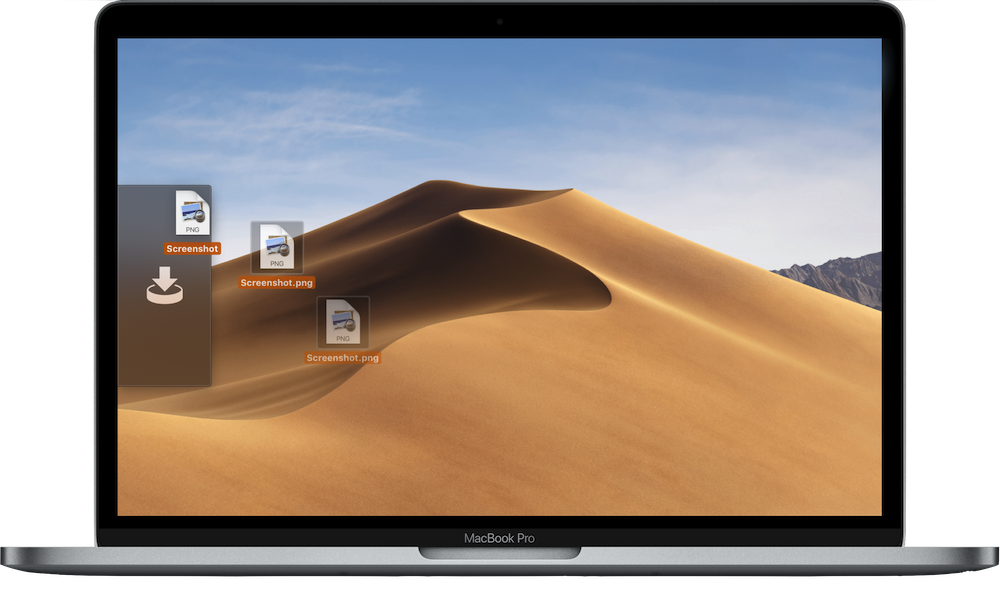
Yoink running on MacBook Pro

What is Yoink?

Yoink offers a temporary place for file- and app-content drags to free your mouse so you can more easily and quickly navigate to the actual destination of your drag.
This is especially helpful when it comes to moving and copying files between different windows, spaces or (fullscreen-) apps.

How does Yoink fit into my workflow?

Yoink stays in the background most of the time, waiting for you to drag something. The app fades in at the edge of your screen when you start a drag, like a file in Finder, or app-content like an image from a website, or text from a document.
Drag your files to Yoink, and your mouse is free for you to navigate more easily and comfortably. Yoink will hold on to the files you drag to it until you drag them out again.

The app can be customized in a number of ways.
You can set up where it should appear (at either side of your screen, top, center or bottom; or at the mouse cursor), when it should appear (when a drag starts, or when a drag reaches the edge of your screen) and what apps it should (or should not) appear in.
If a file drag contains multiple files, a Stack is created so you can drag them out together again easily. Stacks can also be split up if you’d like to drag out one specific file in that drag.
Quick Look is available for all files you add to Yoink, as icon previews for quick identification and as full previews for a detailed look.
A keyboard shortcut lets you hide Yoink if you currently don’t need it, and show it again when you do.

Pricing and Availability

Yoink for Mac is available on the Mac App Store for the price of $7.99 / £7.99 / €8,99, with a free, 15-day trial available on its website.
** To celebrate Yoink for iPad and iPhone being featured on the App Store, Yoink for Mac is ~22% off for a limited time **

Yoink is also part of the “Eternal Storms Software Productivity Bundle” – together with ScreenFloat and Transloader at ~25% off on the Mac App Store (requires macOS Mojave 10.14 – though apps purchased with a bundle on macOS Mojave are available on earlier versions of macOS for free re-download).

It requires at least macOS Lion 10.10, macOS High Sierra 10.14 or newer is recommended.
The app is localized in English, German, French, Italian, Chinese (Simplified), Korean, Japanese, Portuguese (Portugal) and Portuguese (Brazil).

Yoink is also available for iPad and iPhone, exclusively available on the App Store for the price of $5.99 / £5.99 / €6,99.
** To celebrate Yoink for iPad and iPhone being featured on the App Store, Yoink for iOS is ~35% off for a limited time **

Links

Yoink for Mac – Website
Yoink for Mac – Mac App Store
Yoink for Mac – Usage Tips
Yoink for Mac – Press Kit
Yoink for Mac – App Preview Video (Basic Functionality)
Yoink for Mac – App Preview Video (Today Widget)
Yoink for Mac – App Preview Video (Share)

Yoink for iPad and iPhone – Website
Yoink for iPad and iPhone – App Store
Eternal Storms Software – Website
Eternal Storms Software – Blog
Eternal Storms Software – Twitter
Eternal Storms Software – YouTube
Eternal Storms Software – Facebook
Eternal Storms Software – Instagram


I’m looking forward to seeing and hearing what you think about this update. I hope you’ll enjoy it 🙂

If you have any feedback or questions, please don’t hesitate to write me!


With warm regards,
– Matt

Read more