
Release Notes

Yoink for Mac drastically improves and simplifies drag and drop on the Mac.
Version 3.7.1 improves support for Mail.app drags, colors, links, and more!


What is Yoink?

Yoink is a temporary place for your file drags. Whether you want to collect images from a website, text snippets from a document, or move files around in Finder, Yoink offers a “shelf” you can place them in so you can move freely to the files’ actual destination. It can hold virtually anything you can drag and appears whenever you start to drag something. It’s also highly customizable to fit your needs. It also comes with a clipboard history, easily accessibly via widgets, or the “shelf” itself.


What’s New in Yoink v3.7.1?

Copy color values more easily
  • Improves support for multiple emails dragged from Mail
  • Improved support for dragged mailto:, ftp(s):, afp:, ssh: and telnet: links
  • Improved Sharing of different file types
  • Color values can now be easily copied (see video above)
  • Fixes a bug in some localizations where the “Advanced” tab in Settings was permanently disabled
  • Many more bug fixes

🔗 For the full release notes, please click here.


Links and Availability

➡️ Website + free, 28-day trial + Direct Purchase
🖥️ Mac App Store (one-time lifetime purchase)
🔁 Setapp (also has my apps ScreenFloat and Transloader, plus over 250 awesome apps with one subscription, 7-day trial)
Yoink for Mac is currently localized into English, German, French, Italian, Portuguese, Japanese, Simplified Chinese and Korean
💡 Usage Tips

📱 Yoink is also available as a separate purchase for iPhone and iPad

💌 Contact & Connect


If you have any feedback or questions, please don’t hesitate to use the contact link above, or below : )
Have a great day, and thank you for stopping by.
Read more

Yoink for Mac drastically improves and simplifies drag and drop on the Mac. Now in version 3.7, it does it even better – many improvements and bug fixes make sure of that.


What is Yoink?

Yoink is a temporary place for your file drags. Whether you want to collect images from a website, text snippets from a document, or move files around in Finder, Yoink offers a “shelf” you can place them in so you can move freely to the files’ actual destination. It can hold virtually anything you can drag and appears whenever you start to drag something. It’s also highly customizable to fit your needs. It also comes with a clipboard history, easily accessibly via widgets, or the “shelf” itself.


What’s New in Yoink v3.7?

  • Yoink now automatically hides again if it was hidden before a drag
  • The app is now more responsive and stable
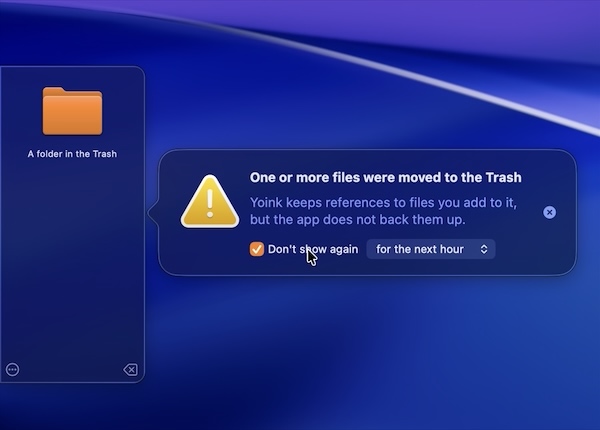
  • The “File in Trash” popover can now be muted
    • Additionally, a Trash icon is now shown for files currently in the trash
  • Improves support for drags from private Firefox windows
  • Improves support for drags from Transmit
  • Updated the UI
  • Increased the number of copied items the clipboard history can hold
  • Improves behavior when screen changes occur
  • Fixes a bug where Yoink would hide even though a file was just dropped onto it
  • Fixes potential issues with Quick Look, Continuity Camera and the Clipboard History widget
  • Finally removed the experimental “resolve alias” option. While it did resolve alias files, the resulting path was no longer usable by Yoink on newer versions of macOS
  • and much more!

🔗 For the full release notes, please click here.


Links and Availability

➡️ Website + free, 28-day trial + Direct Purchase
🖥️ Mac App Store (one-time lifetime purchase)
🔁 Setapp (also has my apps ScreenFloat and Transloader, plus over 250 awesome apps with one subscription, 7-day trial)
Yoink for Mac is currently localized into English, German, French, Italian, Portuguese, Japanese, Simplified Chinese and Korean
💡 Usage Tips

📱 Yoink is also available as a separate purchase for iPhone and iPad

💌 Contact & Connect


If you have any feedback or questions, please don’t hesitate to use the contact link above, or below : )
Have a great day.

Read more

Yoink for Mac, my app that drastically simplifies drag and drop, is now available in v3.6.104, fixing a bunch of bugs and minor issues. Also, in addition to being available on the Mac App Store and Setapp, it is now available for purchase directly from my website (joining ScreenFloat and DeskMat).


What is Yoink?

Yoink is a temporary place for your file drags. Whether you want to collect images from a website, text snippets from a document, or move files around in Finder, Yoink offers a “shelf” you can place them in so you can move freely to the files’ actual destination. It can hold virtually anything you can drag and appears whenever you start to drag something. It’s also highly customizable to fit your needs.


What’s New in Yoink v3.6.104?

It isn’t a sexy release, but a good one nonetheless, fixing a bunch of bugs and minor issues, like the shelf sometimes not appearing in different spaces, and improved Force Touch handling.
It now also shows release notes in-app and allows for completely voluntary in-app tipping. The app remains a one-time lifetime purchase, and the update is free for existing customers.


Links and Availability

➡️ Website + free, 28-day trial + Direct Purchase
🖥️ Mac App Store (one-time lifetime purchase)
🔁 Setapp (also has my apps ScreenFloat and Transloader, plus over 250 awesome apps with one subscription, 7-day trial)
Yoink for Mac is localized into English, German, French, Italian, Portuguese, Japanese, Simplified Chinese and Korean
💡 Usage Tips

📱 Yoink is also available as a separate purchase for iPhone and iPad

💌 Contact & Connect


If you have any feedback or questions, please don’t hesitate to use the contact link above, or below : )
Have a great day.

Read more

I’ve just released an update for Yoink for Mac – a utility that improves drag and drop on your Mac substantially!


Improvements and Fixes in v3.6.103

  • In addition to webp, heic and tiff files, Yoink now optionally provides alternate jpg/png data for svg files
  • Improved the sizing of the Quick Look panel
  • Fixes a bug where the Quick Look panel would not disappear
  • Fixes an issue where items sometimes ended up in Yoink twice
  • Improves webloc favicon rendering on macOS Tahoe
  • Fixes a UI glitch where sometimes icons for stacks would be cut off

Links and Availability

➡️ Website + free, 28-day trial
🖥️ Mac App Store (one-time lifetime purchase)
🔁 Setapp (over 250 awesome apps with one subscription, 7-day trial)
💡 Usage Tips

Yoink is also available as a separate purchase for iPhone and iPad.

💌 Contact & Connect


If you have any feedback or questions, please don’t hesitate to use the contact link above, or below : )
Have a great day.


Read more