Release Notes

Yoink v2.3 for iPad and iPhone is now available on the App Store and brings a couple of neat new features for users of iOS 15 and iPadOS 15.

Yoink is a file- and snippet “shelf”, in a “hold this for me while I do something else for a while” sort of way.
Anything you can drag, copy, share or download, you can store in Yoink.
When you eventually need it, you can access files either directly from within the app, Yoink’s custom keyboard, and Siri Shortcuts. It also syncs across your iOS devices via iCloud.

First things first, with this update, I’ve decided to drop support for iOS 11, up to and including iOS 13, and will only support iOS 14 and newer going forward. After taking a look at the app’s usage statistics Apple provides on App Store Connect, having Yoink support iOS all the way back to version 11, which I did up until today, doesn’t make sense anymore.

What’s New in Yoink v2.3 for iPad and iPhone [on iOS 15]

+ Picture-in-Picture, with a twist.
With Yoink’s Picture-in-Picture you can, of course, play videos.
But you can also show websites, images, texts, eMails and PDFs in PiP.
Below are two videos showing a website being scrolled in PiP, and images being shown in PiP.

A website being opened – and scrolled – in Yoink’s Picture-in-Picture mode. Scrolling also works in text-, eMail- and PDF files.
Images being shown in Yoink’s Picture-in-Picture mode.

Now, you might ask, as I have when I first came up with the idea: “Isn’t this what Slide-Over is for, or Side-by-Side?”.
Well, yes. Until you’ve used this.
If you need an overlay wherever you currently are, not wanting to worry about having to manage the Slide-Over app when switching between full screen apps, this comes in very handy. I haven’t used it for a long while yet (this feature is internally maybe two weeks old), but I’ve been using it daily ever since. It also focuses entirely on the content it displays, without the app’s UI taking up screen space.

+ Support for Quick Notes
Select a file in Yoink and you’ll be able to reference it in a Quick Note, as you can see in the video below.

+ Mouse/Trackpad Band Selection on iPad
A minor improvement, but still very useful, you can now draw a rectangle around files to select them if you’re using an iPad with a mouse or trackpad.

+ Inter-app Drag and Drop on iPhone
Not really a new feature of Yoink itself, but of iOS 15 in general is drag and drop of content between apps.
This makes Yoink’s keyboard on iPhone now on-par with the iPad version, because now you can drag content from Yoink’s keyboard directly into the text area; no copy-paste necessary.

What’s New in Yoink v2.3 for iPad and iPhone [aside from iOS 15-only features]

+ Improved Info Panel
I’ve improved the Info panel, especially for Stacks. Instead of just showing the size of the Stack, you now have quick access to all files contained within it, which you can drag out, copy, or share right away.

The improved Info panel for Stacks now shows the files contained within, which you can drag out, copy or share right away.

On iOS 15, the Info panel, depending on whether you’re using the app in full screen or not, is now presented as a sheet, allowing you to view more content at once.

The Info Panel as a sheet on iOS 15.

+ Audio can now continue playing in the background
+ Yoink now appears in “Open In” dialogs
+ Many, many performance-, compatibility- and reliability improvements
+ Even more bug- and crash fixes

Where can I get Yoink?

Yoink is available for iPad and iPhone on the App Store; it’s a one-time purchase of $5.99 / € 5,99 / ÂŁ 4.99.
It requires iOS 14 or newer. To sync across your iOS devices, an iCloud account is required.

Yoink is also available for Mac on the Mac App Store.

Further Links

Yoink for iPad and iPhone Website | Yoink on the iOS App Store
Yoink for iOS Usage Tips
Yoink for iOS Press Kit (.zip download)

Yoink for Mac Website | Yoink on the Mac App Store
Yoink for Mac Usage Tips
Yoink for Mac Press Kit (.zip download)

Read more

Yoink for Mac v3.5.16

This update contains a couple of quality-of-life improvements and a few bug- and crash fixes.

Website (+ demo)
Mac App Store
Setapp

Yoink for iPad and iPhone v2.2.5

It was actually supposed to be v2.2.4, but I mistyped, so here we are.
Improves the “Get Item from List” Siri Shortcut by providing icons and subtitles for improved identification of items.
It also fixes two crashes, one of which occurred on iOS 15.

Website
iOS App Store

Transloader for Mac v3.0.4

This improves the synchronization of your downloads’ statuses and file sizes, and fixes a couple of bugs along the way.

Website (+ demo)
Mac App Store
Setapp

Transloader for iPad and iPhone v3.0.4

More bug fixes (and also includes the status / file size sync improvements of the Mac version).

Website
iOS App Store (free)

Enjoy 🤗

Read more

Icon of Yoink for iPad and iPhone

Yoink v2.0.1 for iPad and iPhone brings many bug fixes and improvements, increasing the overall stability and performance of the app. It is a free update for existing customers.

Yoink Overview

What’s Yoink?

Yoink is your storage space (or “shelf”, as some would call it) for everything you’d like to keep around for a little while – text snippets, images, files – just about anything you wish.
Use drag and drop with Yoink as a Slide-Over or Side-by-Side app to store files, or use the Action/Share extension, the Today Widget or the File Provider to get files into Yoink.

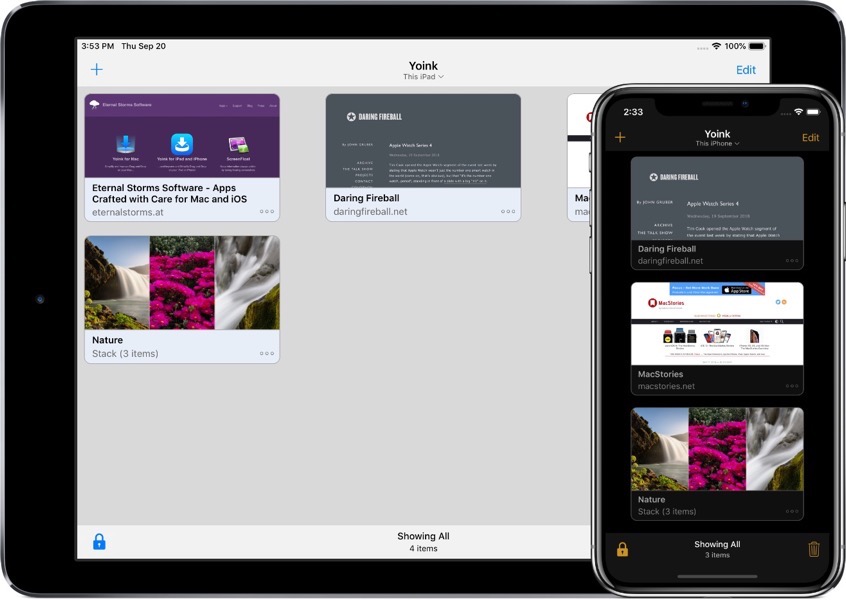
Screenshot of Yoink running on iPad and iPhone

How does Yoink work?

The most obvious use case is to drag and drop files to it from other apps, like selected text, or images from websites, or emails, or map locations, just to name a few.
However, there are a number of ways to save files in Yoink:
– Yoink’s Share/Action extension shows up in almost any share sheet
– The Today widget lets you quickly store your clipboard’s contents
– In the Files app, you can drag and drop files to Yoink’s file provider (and actually do that from any app that supports iOS 11’s files browser)
– Siri Shortcuts help you save your clipboard’s contents or start downloads with a simple voice command, and without having to activate Yoink 

So, now that you’ve got all your files in Yoink, how can you get them out again?

– You can drag and drop anything from Yoink to any other app that supports drag and drop (and the dragged file types).
– Anything in Yoink can be copied to your clipboard.
– Yoink’s keyboard: Wherever you’re editing text, Yoink is right there with you – in the form of a keyboard.
On iPad, drag and drop items out to where you’d like them in your text; on iPhone tap to copy items.
– Yoink’s Today widget: Tap any item in the widget and it’s copied to your clipboard
– The file provider: Any app that support’s iOS 11’s Files browser can access items stored in Yoink
– Spotlight search: The system-wide search can find any item stored in Yoink and take you right to it in the app

What’s New in Yoink v2.0.1?

Being a maintenance update, there are no flashy new features. Instead, the update focuses on stability, reliability and performance.
Apart from fixing a couple of crashes, improving the reliability of iCloud sync and saving items in Yoink in general and many minor improvements and bug fixes, the update now (finally! – I know) fully supports the new iPads’ screen sizes, makes it easier to access Yoink’s settings and switch to Dark/Light mode, and, when sharing a URL to Yoink, it tries to figure out for you if you’d like to download a file, or just save the link in Yoink.
You can find the full list of changes on Yoink’s App Store page.

Pricing and Availability

Yoink for iPad and iPhone is available on the App Store for the price of $5.99 / ÂŁ5.99 / €6,99, with all features unlocked – there’s no subscription or in-app purchase. 

Yoink requires an iPad or iPhone that runs iOS 11 or newer. It’s available in English, German, Japanese, Simplified Chinese and Korean. More languages will follow.

Yoink is also available for (and originated on) Mac, exclusively available on the Mac App Store for the price of $6.99 / ÂŁ6.99 / €7,99, with a free, 15-day trial available on its website.

Links

Yoink for iPad and iPhone – Website
Yoink for iPad and iPhone – App Store
App Preview Video – “Add”
App Preview Video – “Drag out”
Yoink for iPad and iPhone – Usage Tips
Yoink for iPad and iPhone – Press Kit

Yoink for Mac – Website
Yoink for Mac – Mac App Store
Eternal Storms Software – Website
Eternal Storms Software – Blog
Eternal Storms Software – Twitter
Eternal Storms Software – YouTube
Eternal Storms Software – Facebook
Eternal Storms Software – Instagram

I’m looking forward to seeing and hearing what you think about this update. I hope you’ll enjoy it 🙂

If you have any feedback or questions, please don’t hesitate to write me!

With warm regards,
– Matt

Read more

Yoink for iPad and iPhone - Icon

I’m very pleased to announce the immediate availability of Yoink v2.0 for iPad and iPhone.
It’s a a free upgrade for everyone who’s purchased before and has a lot of great, new features, like iCloud Sync, Handoff and Siri Shortcuts.

Yoink Overview

What’s Yoink?

Yoink is your storage space (or “shelf”, as some would call it) for everything you’d like to keep around for a little while – text snippets, images, files – just about anything you wish.
Use drag and drop with Yoink as a Slide-Over or Side-by-Side app to store files, or use the Action/Share extension, the Today Widget or the File Provider to get files into Yoink.

Yoink 2.0 running on iPad Air and iPhone X

How does Yoink work?

The most obvious use case is to drag and drop files to it from other apps, like selected text, or images from websites, or emails, or map locations, just to name a few.
However, there are a number of ways to save files in Yoink:
– Yoink’s Share/Action extension shows up in almost any share sheet.
– The Today widget lets you quickly store your clipboard’s contents
– In the Files app, you can drag and drop files to Yoink’s file provider (and actually do that from any app that supports iOS 11’s files browser)
– Siri Shortcuts help you save your clipboard’s contents or start downloads with a simple voice command, and without having to activate Yoink

So, now that you’ve got all your files in Yoink, how can you get it out again?

– You can drag and drop anything from Yoink to any other app that supports drag and drop (and the dragged file types).
– Anything in Yoink can be copied to your clipboard.
– Yoink’s keyboard: Wherever you’re editing text, Yoink is right there with you – in the form of a keyboard. On iPad, drag and drop items out to where you’d like them in your text; on iPhone tap to copy items.
– Yoink’s Today widget: Tap any item in the widget and it’s copied to your clipboard
– The file provider: Any app that support’s iOS 11’s Files browser can access items stored in Yoink
– Spotlight search: The system-wide search can find any item stored in Yoink and take you right to it in the app

What’s New in Yoink v2.0?

iCloud Sync

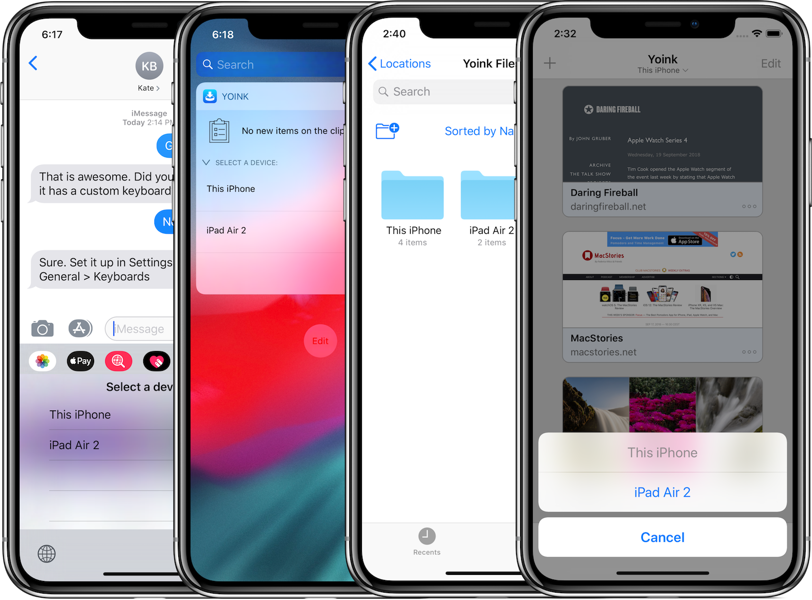
Yoink 2.0 iCloud Sync on iPhone X

Yoink syncs your items across all your iOS devices using iCloud (Mac sync will follow at a later date).
Each device has its own “shelf” in Yoink, neatly grouping items together so you’ll always know where to find them.
Not only are synced files accessible via Yoink itself, but all relevant extensions as well: the keyboard, the today widget, Spotlight and the File provider.

Handoff

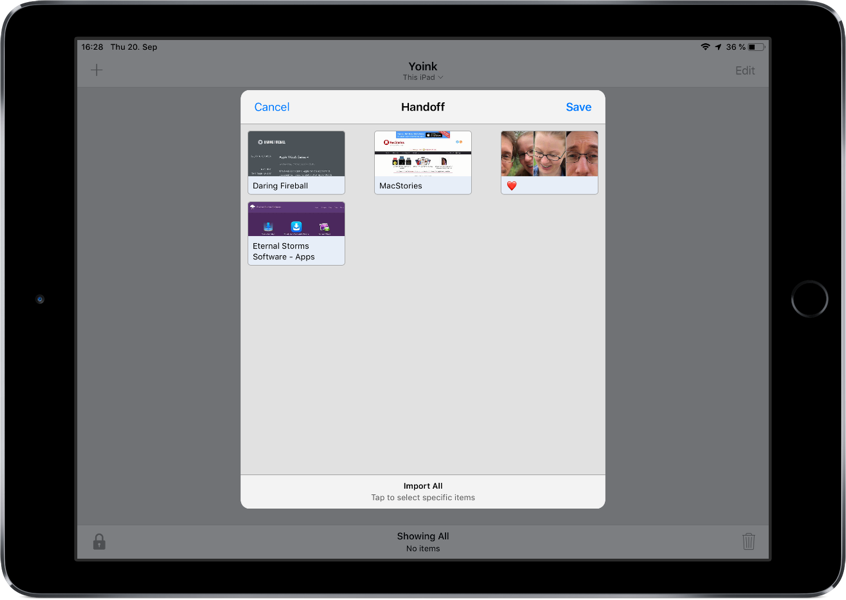
Yoink 2.0 Handoff on iPad Air

Transfer files between your iPads, iPhones and Macs (separate Yoink for Mac app v3.5 required) using Handoff.
When files are selected on the sending device, those are transmitted. If no selection is made, you’ll be able to select on the receiving device.

Siri Shortcuts

Yoink Siri Shortcuts iOS 12 on iPhone X

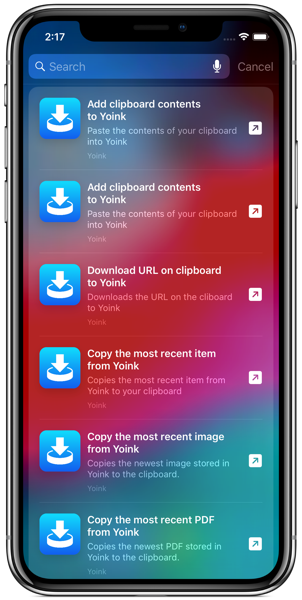
Using Siri on iOS 12, you can store your clipboard’s contents or download the link on your clipboard in Yoink, all without having to switch-to or activate Yoink.
You can also copy files from Yoink, for instance, the most recently added image, PDF, text or weblink.
Lastly, you can tell open to show you a specific sync’ed device with a simple voice command.

Keyboard commands

Yoink can now be almost completely controlled by external keyboards. Selecting items, viewing their contents, searching, copying, pasting can all be done without you having to touch your screen.

Dark Mode and smaller icons

Yoink can now be used in a beautiful dark mode.
You can also set it up to use smaller icons, so you can show more files at once.

… and much more!

There are lots of other improvements and bug fixes, like being able to edit text right from Yoink, improved download notifications, better and more efficient icon creation and Spotlight indexing, support for universal links or in-app search.
Basically, not one part of Yoink has gone unimproved. It uses less memory and has become more responsive and reliable.

Pricing and Availability

Yoink for iPad and iPhone is available on the App Store for the price of $5.99 / ÂŁ5.99 / €6,99, with all features unlocked – there’s no subscription or in-app purchase.

Yoink requires an iPad or iPhone that runs iOS 11 or newer.
It’s available in English, German, Japanese, Simplified Chinese and Korean. More languages will follow.

Yoink is also available for (and originated on) Mac, exclusively available on the Mac App Store for the price of $6.99 / £6.99 / €7,99, with a free, 15-day trial available on its website.

Links

Yoink for iPad and iPhone – Website
Yoink for iPad and iPhone – App Store
App Preview Video – “Add”
App Preview Video – “Drag out”
Yoink for iPad and iPhone – Usage Tips
Yoink for iPad and iPhone – Press Kit

Yoink for Mac – Website
Yoink for Mac – Mac App Store

Eternal Storms Software – Website
Eternal Storms Software – Blog
Eternal Storms Software – Twitter
Eternal Storms Software – YouTube
Eternal Storms Software – Facebook
Eternal Storms Software – Instagram

I’m looking forward to seeing and hearing what you think about this update. I hope you’ll enjoy it 🙂

If you have any feedback or questions, please don’t hesitate to write me!

With warm regards
– Matt

Read more