ScreenFloat

ScreenFloat Mac App Icon

Today I finally was able to release ScreenFloat 1.5.13 on the Mac App Store. It’s a free update for existing customers of the app.
A 15-day trial can be downloaded for free from the website, even if you’ve tried it before.

What Is ScreenFloat?

ScreenFloat lets you create screenshots that float on top of everything, enabling you to keep an eye on information you currently need without having to switch back and forth between windows, applications or spaces.

Customers use it in all sorts of cases – when coding for code snippets, when making wire transfers for IBAN numbers and such, when working in Photoshop to compare images, the list goes on and on.
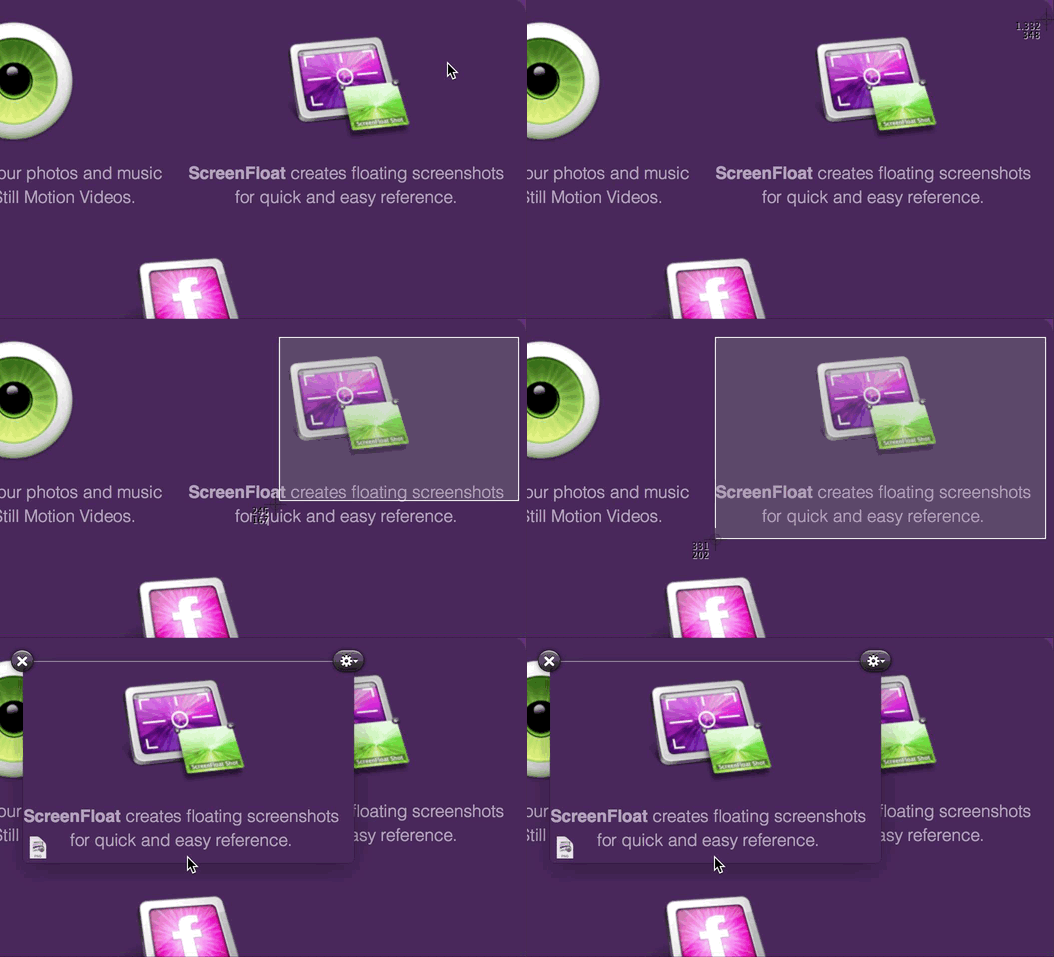
ScreenFloat in Action

Basically, any time you need to keep something in your field of view or need to remember something on screen, ScreenFloat is there for you. The floating shots follow you around, no matter what window, app or space you are in, or you can pin them to specific spaces.

Shots you close are not deleted, but kept for you in the Shots Browser, where you can organize and categorize them:
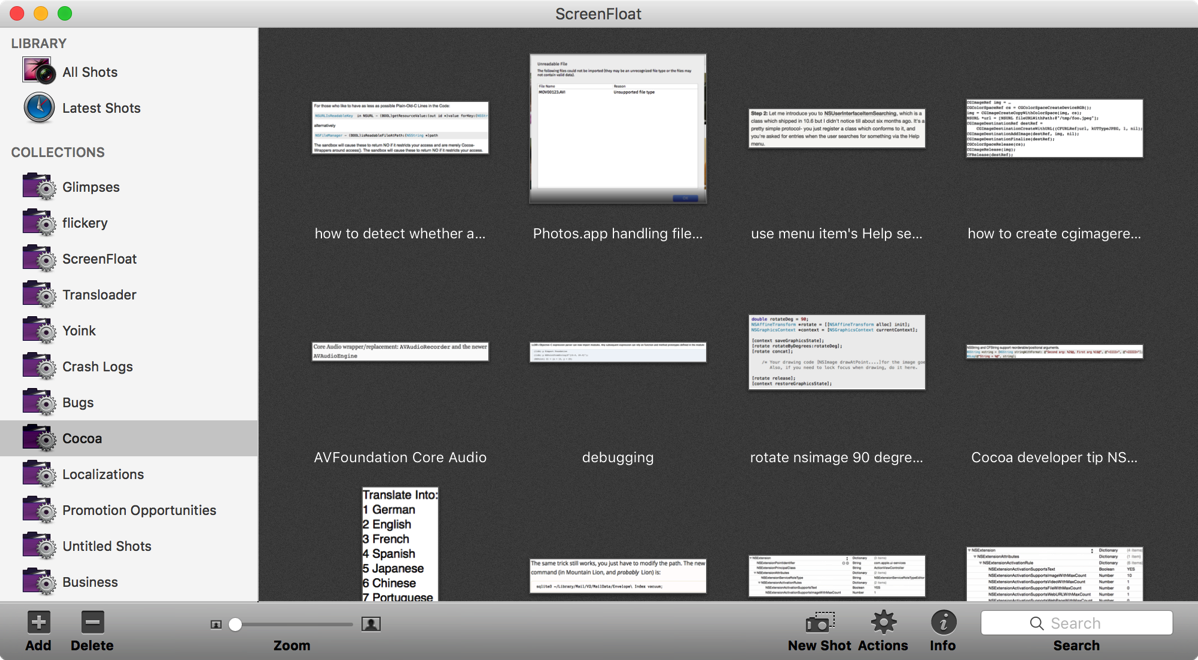
ScreenFloat's Shots Browser

What’s New in ScreenFloat v1.5.13?

• Most importantly, ScreenFloat now works on macOS Sierra.
As I wrote about earlier, macOS Sierra has a new sandbox entitlement that was prohibiting ScreenFloat from performing correctly, so that is fixed now.
While I was at it, I put the screenshot creation into its own XPC process, so I could isolate the new entitlement from the rest of the app, as Apple encourages doing.
• Aside from now working on macOS Sierra, it fixes two bugs and a (rare) crash, so I definitely recommend updating to version 1.5.13.

A Little Background on ScreenFloat’s App Store Review

When I first submitted this update of ScreenFloat to the Mac App Store, I included this line in is App Store description:
“Improves compatibility with macOS Sierra”
The update was rejected because of it. You are not allowed to mention Apple pre-release software in your App Store description. Instead, they suggest you use this line:
“Improves compatibility with an upcoming OS”
I think that’s rubbish. Everyone knows what the next OS is going to be called – it was publicly unveiled already under that name, so the likelihood of it changing now is virtually zero.
Secondly, they have a public beta out, for crying out loud. It’s in peoples’ hands already, but they don’t want developers to let their customers know that the app now works on Apple’s latest and greatest new system?
So I sent an appeal to the Review Board, it got rejected, I submitted the app again with the suggested line and it went through.
Still, I don’t think “an upcoming OS” is helping anyone. In fact, it’s more confusing than anything, if you ask me. “An upcoming OS” is ambiguous, whereas “macOS Sierra” lets the user know exactly what you mean.
Anyway, this will be my process from now on: Submit with my original line mentioning the OS update explicitly, getting rejected, appealing and then submitting with their suggested line. Perhaps they’ll get tired of it and let it through at some point. Probably not, though.

Pricing and Availability

ScreenFloat v1.5.13 is available for purchase on the Mac App Store for the price of $8.99 / £6.99 / €8,99. It is a free update for existing customers of the app.
A 15-day trial can be downloaded for free from the website, even if you’ve already tried the app.
ScreenFloat runs on Macs with OS X Lion 10.7.3 or newer.

If you’re interested in writing about ScreenFloat, you can download its press kit here, which contains screenshots, icons, a short sample video and further information.
A limited amount of promotional codes are available to members of the press at press(at)eternalstorms(dot)at.

Links

ScreenFloat Website
http://eternalstorms.at/ScreenFloat

ScreenFloat on the Mac App Store
https://itunes.apple.com/app/screenfloat/id414528154?mt=12&at=1001l8pT&ct=blog

ScreenFloat Demo Download
http://eternalstorms.at/ScreenFloat/ScreenFloat.zip

ScreenFloat Press Kit
http://eternalstorms.at/press/ScreenFloat-1-Press-Kit.zip

ScreenFloat Video Preview on YouTube
https://youtu.be/MYtEzOP41Os

I’m looking forward to hearing from you and to see what you think about ScreenFloat 1.5.13. If you like the app, please consider leaving a little review on the Mac App Store, it would help me out a lot! Should you have any feedback or questions, please be sure to get in touch, I’d love to hear from you! Thank you.

 

Eternal Storms Software Logo

– – – Do you enjoy my blog and/or my software? – – –
Stay up-to-date on all things Eternal Storms Software and join my low-frequency newsletter (one mail a month at most).
Thank you 🙂


Read more

I’m participating in TwoDollarTuesday’s Black Friday sale with some of my apps (MacStories has great coverage of over 200 deals as well) :


Yoink IconYoink
Simplify and improve drag and drop
40% off – Mac App Store; Website

Screenfloat IconScreenFloat
Create floating screenshots to keep references to anything visible on your screen
28% off – Mac App Store; Website

Transloader IconTransloader
start downloads on your Mac remotely from your iPhone or iPad
30% off – Mac App Store; Website

Glimpses IconGlimpses
turn your photos and music into stunning still motion videos
40% off – Mac App Store; Website 


I hope you’ve had a great Thanks Giving and are enjoying the Black Friday Sale that’s going on 🙂

Read more

NewImage

© Image by Apple, Inc.

OS X Mountain Lion

OS X Mountain Lion has hit the shelves on the Mac App Store and it’s off to a very good start.

So where are the updates for Yoink, ScreenFloat and flickery?

For all of my apps, I’ve submitted updates to the App Store at the beginning of July but they’re still “In Review” or worse, “Waiting for Review”. Here’s the run down of what’s working or not working on OS X Mountain Lion.

Yoink

Yoink works perfectly fine in the currently available version (2.1.1). The upcoming update is a bugfix and minor feature release.
Nothing really changed for Yoink in OS X Mountain Lion that would break the app.

ScreenFloat

ScreenFloat has some minor issues. It works well, but you’ll notice that the “Launch ScreenFloat at Login” checkbox in the preferences is enabled although it shouldn’t be and will crash the app when clicked.

Another issue is with running ScreenFloat with the Dock icon enabled. Floating shots will not follow you to fullscreen apps or spaces. I’m currently looking into that. In the meantime, you can disable the Dock icon and it will work.

flickery

flickery is the most troubling. Not because of OS X Mountain Lion (some minor issues aside – like, the “Nearby” search doesn’t show up – it works well).

The troubling part is that flickr is shutting down their flickrAuth authorization mechanism by July 31st. Yes, that’s very soon and there’s no update out yet for flickery.
I’ve requested an expedited review by Apple for it and I hope they grant it.

If they don’t (and still, if they do, there’s a chance), it might take longer than July 31st for Apple to review the app. What that means is that authorizing flickery to work with your flickr account will not be possible. Also, although flickr doesn’t explicitly state this, it’s inferred that anything done over the flickr API with an old authorization token (an authorization token is what an app receives from flickr when the user authorizes the app to work with their flickr account) will not work anymore. So browsing, uploading, really anything you can do with flickery, will not work.

Please be aware that the upcoming update does include the new OAuth authorization and will make flickery work again with flickr. Until it is reviewed and released by Apple on the App Store, please have a little patience. I know it’s not ideal, but at this point, I’ve done all I can do.

Concluding,

aside from some minor issues with ScreenFloat and flickery, everything basically works on OS X Mountain Lion. For these issues, updates are currently “In Review” or “Waiting for Review” by Apple and should be released soon.

As for flickery, I’ve requested an expedited review and I urge you one more time to consider having a little patience 🙂 Trust me – it troubles me more than anyone.

Thank you for your time,
Take care,

Matt 

[twitter-follow screen_name=’eternalstorms’ show_count=’yes’]

[twitter-follow screen_name=’flickeryapp’ show_count=’yes’]

[twitter-follow screen_name=’screenfloatapp’ show_count=’yes’]

[twitter-follow screen_name=’gimmesometune’ show_count=’yes’]

Read more

icloudPhoto credit: geeky-gadgets.com

iCloud is a big deal for me, and, I believe, for lots of other developers out there as well. Syncing data has become a lot easier with this new service and the according APIs. I once took a glimpse at the MobileMe syncing APIs and my head still spins a little.

What does it mean for flickery?

I’m still thinking of the implications for flickery. I got some nice ideas from users of flickery on twitter and I’m already looking into what is possible and makes sense in terms of flickery.

I could see flickery syncing the items yet to be uploaded or loocking into iCloud’s photo queue and offer an option to upload those items or at least present them in some way in flickery’s upload view.

What does it mean for ScreenFloat?

For ScreenFloat, In a nutshell, it will sync your shots between your devices (I don’t know if a iPhone/iPad version of ScreenFloat is useful, but I’m certainly entertaining the idea of having the shots on, say, your iPad, as well).
It will sync which shots are currently open and floating, which are hidden, which are in your shots browser, it will sync your categories in your shots browser, and their contents.

This is something I wanted to do from the beginning and I’ve been looking into services like DropBox to implement it. Now with iCloud (and yes, I realize it’s still a few months away) it’s even easier, faster, more reliable and more secure to implement.

What does it mean for GimmeSomeTune?

I don’t believe GimmeSomeTune could have any advantages of iCloud in terms of sync. If you find one, leave a comment or write me an e-Mail 🙂

Upcoming Stuff?

I have an upcoming app where iCloud will be perfect and will replace a server-client environment with tedious networking stuff. Stay tuned on that 🙂

[Update (18.06.2011)]

My good friend and honored developer colleague Christian Kienle wrote about the impact that iCloud may have on his applications on his blog.
It’s an interesting read, especially if you’re interested in how you will benefit from iCloud in the near future.

[twitter-follow screen_name=’eternalstorms’ show_count=’no’]
[twitter-follow screen_name=’screenfloatapp’ show_count=’no’] 
[twitter-follow screen_name=’flickeryapp’ show_count=’no’]

Read more