
productivity

ScreenFloat for Mac v2.3.8 is now available, and brings a handful of new features, two handfuls of improvements, and three handfuls of bug fixes.

“The most used tool on my Mac”

wendylou @ Mac App Store

What is ScreenFloat?

ScreenFloat is your Mac’s Screen Capture Power Tool.
Capture screenshots and recordings that float above other windows, allowing you to reference anything on your screen, anywhere. It’s like Picture-in-Picture, only for screen captures.
It keeps your Desktop clutter-free, as every capture you make is stored in its Shots Browser, where you can manage, organize and find your shots. They’re also synced across your Macs over iCloud.
Easily copy the non-copyable, as ScreenFloat recognizes text, barcode and faces in your shots, which also allows you to effortlessly redact sensitive parts of your screenshots.
Add non-destructive annotations, redactions and markup, crop, “fold“, resize, or de-retinize your shots. Quickly pick colors.
Mute, trim and cut your recordings with the aid of “edit markers” you can place while recording. Export them as GIFs.
Create shareable and embeddable links for your captures using iCloud, ImageKit.io or Cloudinary.com.
And so much more.

A screenshot is just a screenshot. Until you use ScreenFloat.
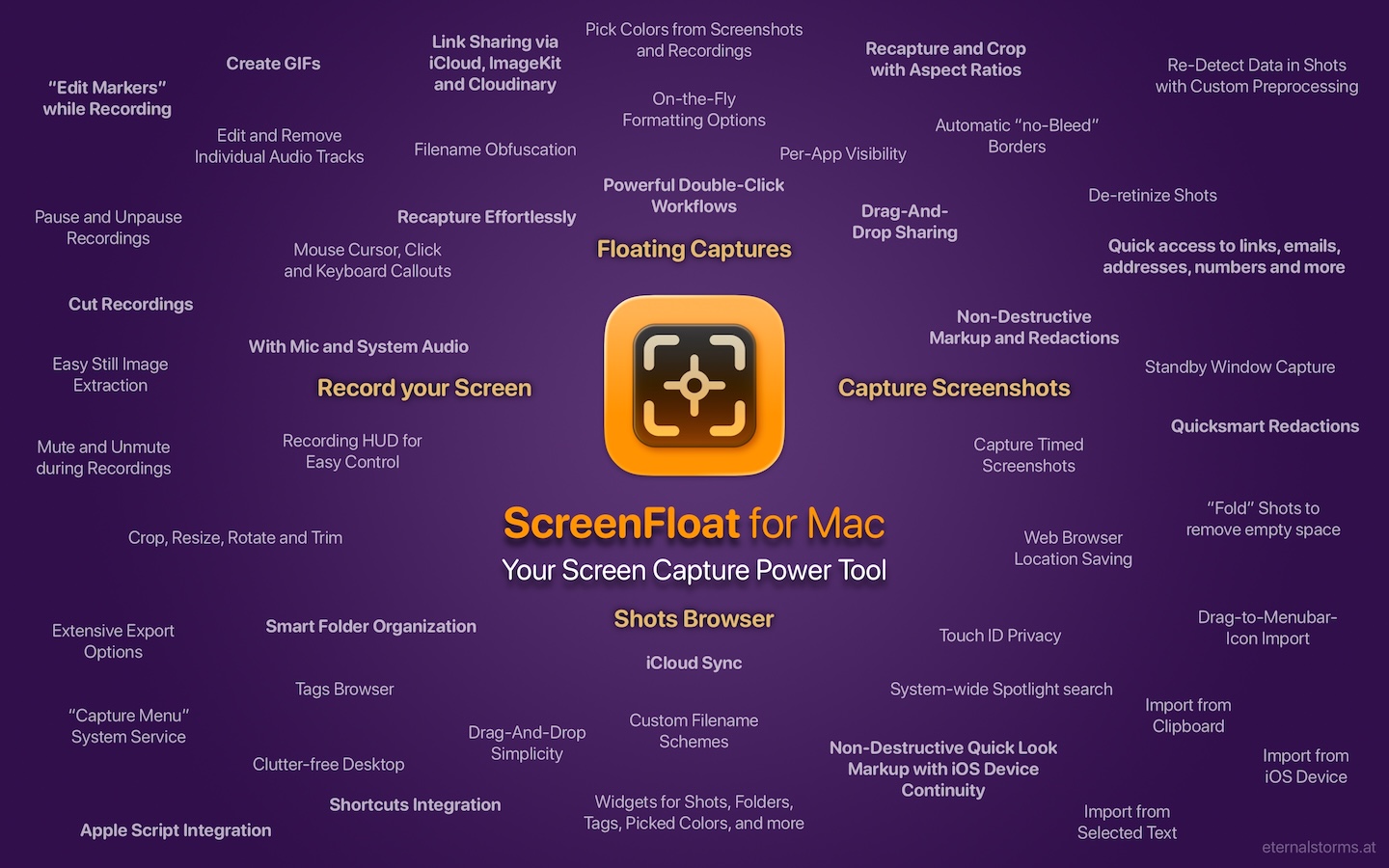
Tip: Check out the Get to Know ScreenFloat 2 Blog Post series for a deep-dive into its functionality and what it can do for you.

“A brilliant app”

Prof. Brian Whalley @ Mac App Store

What’s New in ScreenFloat v2.3.8

Remove captured windows’ shadows after capture, just for exports, or permanently
  • If you like to capture windows with shadows, but need them without from time to time, you can now easily remove them; on-the-fly for export or dragging out, or permanently if you changed your mind. Child window’s shadows are preserved.
  • A new setting to automatically copy new shots to your clipboard
  • Widgets have been improved
    • A “Recapture” Control Widget has been introduced (macOS 26)
      • The Capture widget now also has this functionality
    • You can now choose what should happen when a shot is clicked in a widget: Float, Copy, or Reveal in Shots Browser
  • Overhauled ScreenFloat’s menu bar icon menu
  • Improved the GIF export of videos
  • Recording videos has been improved with better color fidelity and new click highlights
    • Cutting recordings is now more compatible and reliable
  • And much more, like additive, selective copying of detected data : )

👉 For the full release notes, please click here 👈

“Brilliant. Useful. Amazing.”

dan38882 @ Mac App Store

Links and Availability

ScreenFloat is a one-time purchase on the Mac App Store or my website for currently USD 17.99 / EUR 19,99 / GBP 17.99.
It is also part of Setapp.
There is no difference in functionality between the different versions.
As with all previous updates, v2.3.8 is completely free for existing customers.
A free, 28-day trial is available for download.
ScreenFloat requires macOS 12.3 Monterey (macOS 26 Tahoe recommended for full functionality)
A (free) iCloud account is required if you want to sync your ScreenFloat library across your Macs.
ScreenFloat is currently localized in English, German, Chinese (Simplified), and Dutch.

🔗 ScreenFloat Website + Free Trial + Direct Purchase
🖥️ ScreenFloat on the Mac App Store
➡️ ScreenFloat on Setapp (offers a 7-day trial for all 200+ apps, including my Mac apps Yoink and Transloader)
🤩 Eternal Storms Software Productivity Bundle on the Mac App Store (includes ScreenFloat, Yoink for Mac, Transloader and DeskMat at ~20% off)

📖 Get to Know ScreenFloat 2 Blog Post Series | User Guide
💡 ScreenFloat 2 Usage Tips

💌 Contact & Connect

A note on in-app purchases in the Mac App Store version: These are completely voluntary tips you can give me to support me and the development of my apps beyond the one-time purchase price. No additional functionality can be unlocked by giving tips. Your one-time purchase gives you to the complete functionality of ScreenFloat.

[Update July 22nd, 2026] : v2.3.9 is now available, fixing a potential crash when exporting shots, introduced in v2.3.8.

“An app that I honestly don’t know how I lived without it”

Chariklia M. @ Setapp

I hope you enjoy ScreenFloat (and my other apps) : )

“One of my most used Apps!”

paradox2222 @ Mac App Store
Read more

Yoink for iOS Icon

It’s here.
After an unnecessarily long, extended time in App Review, I’m so happy to be able to tell you that Yoink for iPad and iPhone with iOS 11 is now finally available on the App Store.

What’s Yoink for iPad and iPhone?

Yoink strives to improve and simplify drag and drop and speed up your workflow.
It accepts almost anything you can drag, copy or share on your iPad and stores it for later use. This way, your fingers are free for more important things.

Here’s a quick YouTube video of how it works (check your sound, there’s some music) :

How can I add stuff to Yoink?

Obviously, especially on iPad, Yoink was designed for drag’n’drop use, and using it as a Slide-Over or Side-by-Side app, I’d say that’s the best way to use it. Just slide Yoink over any app you’re in and drag to it anything you need later. Then slide it back out, if it’s in your way.
There are, however, other ways to add items to Yoink. It can grab the contents from your clipboard and it offers a Action / Share extension, so that whenever you use a Share sheet in iOS, you can add that shared item to Yoink – no drag and drop required. The app doesn’t even have to run.

How do I get stuff out of Yoink?

That’s just as easy. Either use drag and drop, or copy the items, or share them from within the app.
Yoink comes with a custom keyboard extension, which lets you use items you’ve stored in Yoink without having to leave the active app you’re currently editing text in – just switch to Yoink’s keyboard and drag out (or copy, if you’re on iPhone) the items to the destination in your text.
All items in Yoink are indexed by Spotlight, so you can use the system-wide search to find items. The results are draggable as well.

Yoink Custom Keyboard

How are items in Yoink represented?

Yoink creates a rich preview for every item you add, so that, at a glance, easy identification is possible (for example, web link items show part of the website, map locations show a preview using Apple Maps).
A full look at the item is available by tapping onto the item.

Deleting Items

Yoink doesn’t delete items right away. Instead, like in Photos.app, items you drag out of Yoink or delete are put into the Trash, where they remain for a specified amount of time, after which they’re really deleted.
So should you find you still need an item, you can restore it right away.

Pricing and Availability

Yoink for iOS is available on the App Store right now, for the introductory price of $2.99 (€3,49) – it will rise in November.
An iPad or iPhone with iOS 11 is required.

Yoink is also available on the Mac, and for the occasion, its price has also been reduced for a limited time! 🙂

Links

Yoink for iPad and iPhone Website: https://eternalstorms.at/yoink/ios
Yoink for iOS Usage Tips: https://eternalstorms.at/yoink/ios/tips
Yoink for iPad and iPhone on the App Store: https://itunes.apple.com/app/id1260915283?mt=8
Yoink for iOS Press Kit: https://eternalstorms.at/press/Yoink-iPad-1-Press-Kit.zip

Yoink for Mac Website: https://eternalstorms.at/yoink/mac
Yoink for Mac Usage Tips: https://eternalstorms.at/yoink/mac/tips
Yoink on the Mac App Store: https://itunes.apple.com/app/id457622435?mt=12
Yoink for Mac Press Kit: https://eternalstorms.at/press/Yoink-3-Press-Kit.zip

Delay of Release

I had planned and was ready for releasing Yoink for iPad together with iOS 11, on September 19th, 2017. As you may know, that didn’t work out. The app was ready, I was set, but App Review wasn’t happy with the app and so I missed the date, while other, let’s say similar apps, were allowed in.
After a lot of discussion by mail and phone with the App Review team, and having to remove some things from the app, Yoink was finally approved yesterday.

Thank you for your patience, and I hope you enjoy the app 🙂 Please spread the word and if you have the time and like the app, please consider leaving a little review on the App Store – it would mean a lot to me!

Eternal Storms Software Logo

– – – Do you enjoy my blog and/or my software? – – –
Stay up-to-date on all things Eternal Storms Software and join my low-frequency newsletter (one mail a month at most).
Thank you 🙂

Read more