Yoink for Mac

NewImage

© Image by Apple, Inc.

OS X Mountain Lion

OS X Mountain Lion has hit the shelves on the Mac App Store and it’s off to a very good start.

So where are the updates for Yoink, ScreenFloat and flickery?

For all of my apps, I’ve submitted updates to the App Store at the beginning of July but they’re still “In Review” or worse, “Waiting for Review”. Here’s the run down of what’s working or not working on OS X Mountain Lion.

Yoink

Yoink works perfectly fine in the currently available version (2.1.1). The upcoming update is a bugfix and minor feature release.
Nothing really changed for Yoink in OS X Mountain Lion that would break the app.

ScreenFloat

ScreenFloat has some minor issues. It works well, but you’ll notice that the “Launch ScreenFloat at Login” checkbox in the preferences is enabled although it shouldn’t be and will crash the app when clicked.

Another issue is with running ScreenFloat with the Dock icon enabled. Floating shots will not follow you to fullscreen apps or spaces. I’m currently looking into that. In the meantime, you can disable the Dock icon and it will work.

flickery

flickery is the most troubling. Not because of OS X Mountain Lion (some minor issues aside – like, the “Nearby” search doesn’t show up – it works well).

The troubling part is that flickr is shutting down their flickrAuth authorization mechanism by July 31st. Yes, that’s very soon and there’s no update out yet for flickery.
I’ve requested an expedited review by Apple for it and I hope they grant it.

If they don’t (and still, if they do, there’s a chance), it might take longer than July 31st for Apple to review the app. What that means is that authorizing flickery to work with your flickr account will not be possible. Also, although flickr doesn’t explicitly state this, it’s inferred that anything done over the flickr API with an old authorization token (an authorization token is what an app receives from flickr when the user authorizes the app to work with their flickr account) will not work anymore. So browsing, uploading, really anything you can do with flickery, will not work.

Please be aware that the upcoming update does include the new OAuth authorization and will make flickery work again with flickr. Until it is reviewed and released by Apple on the App Store, please have a little patience. I know it’s not ideal, but at this point, I’ve done all I can do.

Concluding,

aside from some minor issues with ScreenFloat and flickery, everything basically works on OS X Mountain Lion. For these issues, updates are currently “In Review” or “Waiting for Review” by Apple and should be released soon.

As for flickery, I’ve requested an expedited review and I urge you one more time to consider having a little patience 🙂 Trust me – it troubles me more than anyone.

Thank you for your time,
Take care,

Matt 

[twitter-follow screen_name=’eternalstorms’ show_count=’yes’]

[twitter-follow screen_name=’flickeryapp’ show_count=’yes’]

[twitter-follow screen_name=’screenfloatapp’ show_count=’yes’]

[twitter-follow screen_name=’gimmesometune’ show_count=’yes’]

Read more

NewImage

Presenting Yoink 2.0

Screenshot of MarsEdit


A picture usually says more than a bunch of words.

What is Yoink?

Yoink is an created to make “drag’n’dropping” files easier.
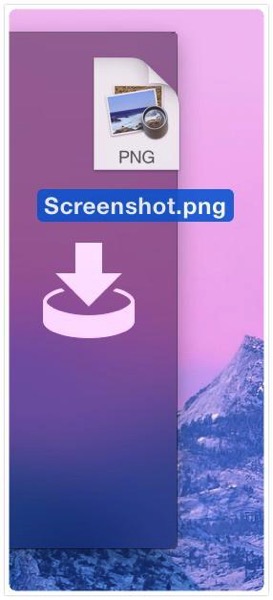
It shows a “shelf” when you start dragging files or content from applications so you can drop them onto Yoink. This way, your mouse is free for you to move between Finder windows, apps, spaces, fullscreen applications, etc.
Once you are where the files are supposed to go, you can drag the files out of Yoink again to drop them to their destination.

What’s new in version 2.0?

I got a lot of feedback on Yoink 1.0 from customers (thank you very much, by the way) and the changes you see in Yoink 2.0 are a direct result of it.

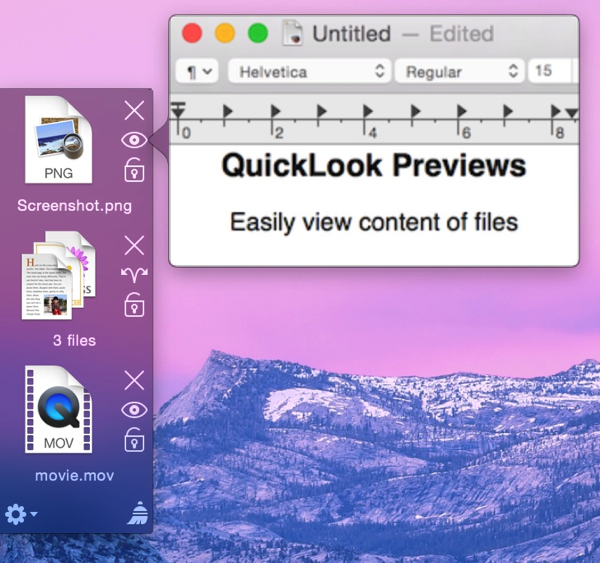
As you can tell from the image above, there’s a new look – done by the very talented Dietmar Kerschner.

Secondly, you can finally drop content from application onto Yoink – meaning images, text passages or links from within websites, for example. Or files on a server from the FTP client Transmit.

Also pictured in the image image above is a file stack. New in Yoink 2.0, when you drag multiple files onto Yoink at once, they’re not separate items in the list but just one item so you can easily drag them out at once again.

I’ve added a hotkey so you can manually show Yoink’s window so you can drag files from a Dock’s stack or applications like iTunes or Adobe Bridge that don’t trigger Yoink’s window for technical reasons – they use a non-standard NSPasteboard instance to do their dragging duties.

There are four new positions available – left, pinned to the top, left, pinned to the bottom, right, pinned to the top and right, pinned to the bottom (additional to the already existing left center and right center).

Availability and Pricing

Yoink is available exclusively on the Mac App Store for $2.99. But as usual, there’s a free, fully functional 15-day trial available at Yoink’s website (direct download). There’s also a quick screencast that shows exactly what Yoink does, and how it does it.

Feedback Appreciated

I really appreciate your feedback, input and criticism, so please do not hesitate to write me if you have any comments on my apps. Thank you kindly 🙂

[twitter-follow screen_name=’eternalstorms’ show_count=’yes’]

Read more

YoinkIcon

Presenting: Yoink – taking the drag out of drag and drop

Functionality

Have you ever tried dragging something from, say, Finder, to a fullscreen app in Lion? It’s a pain. This is where Yoink comes in. Every time you start dragging a file, Yoink shows a window you can drag those files to. Then you just switch to the space or fullscreen app you’d like to drop the files to and drag them out of Yoink to the app. Very simple. There’s a video on the website which does a pretty good job at explaining what Yoink does, exactly.

The idea behind Yoink

The idea came to me while trying to drag a file from Finder to a new message in fullscreen Mail.app. I just couldn’t do it. Then I tried to drag images from Finder to Xcode in fullscreen. Not very easy either. Thus, Yoink was born.

The name

The original app for this little app was DragHelper. Yes, I know – why did I ever change it?
Well, I was watching the Simpsons, in the episode where Bart takes the last Doughnut or bearclaw or whatever it was from Kent Brockman’s plate by exclaiming “Yoink!” (to which Brockman asks himself: Yoink?!?) and I thought – that’d be a great name for an app that “yoinks” the dragged files.

Why Lion only?

The main reason is because I didn’t see the problem on Snow Leopard. The other reason is that I really wanted to try out the new NSTableView view-based APIs 🙂 They’re very nice and shiny.

The menu bar icon controversy

The number one request I get from customers is to put in an option to remove the menu bar icon (the black down arrow). Well, I didn’t want it in there in the first place.
The first time I submitted Yoink to the Mac App Store, it got rejected because it didn’t have a way to quit the app if Yoink’s window wasn’t visible (the rejection note stated (somewhat paraphrased) “The app can’t be quit if the window is not visible”).

So I thought to myself: what’s the least obtrusive way to make it quittable at any given time _without_ putting an icon in the menu bar. Because why for the sweet love of God would Yoink need a menu bar icon? It’s a background app, for crying out loud.
So I put in a global hotkey for quitting Yoink and made it clear in the splash screen. Submitted it again.

Another rejection followed. This time, the rejection note stated “There needs to be a menu bar or an application menu or a status menu to include a quit item” (why this wasn’t stated in the first rejection is beyond me, but to err is human, and I’ve erred quite a couple of times, so I’m not complaining). Since it’s a background app, the first two were not possible, since background apps do not have their own menu bars – the only thing that was left was the menu bar icon. So I put it in there, and that was that.

Since I was pressed for time, I didn’t implement an option to hide the menu bar icon, but believe me, the upcoming update will include such an option. As I said, I don’t want that menu bar icon either. I just don’t see it make any sense.

The no launch on login controversy

The second most requested feature was to add a “Add to login items” button in Yoink’s preferences.
I tried to implement it, but in the sandbox environment of Lion, in which Yoink is running, it is currently not possible to do. I’ll have to wait until Apple fixes this until I can implement it.

Pricing and availability

Yoink is available exclusively through the Mac App Store for $2.99/€2.39. A free 15-day trial is available at the website (direct download link)

As always, I very much appreciate your feedback, bug reports and feature requests, so please keep them coming 🙂

Thank you and enjoy,
Matthias

Read more